



1. Portfolio and Project Structure
Teams needed to manage multiple contracts and projects while retaining the ability to inspect individual project elements. A flat project list would not provide enough context for complex project structures.


Softlabs developed a centralized, role-based web application for Birdi Systems to plan and control capital projects across contracts, project elements, schedules, budgets, actual costs, forecasts, approvals and supporting documents.
 United States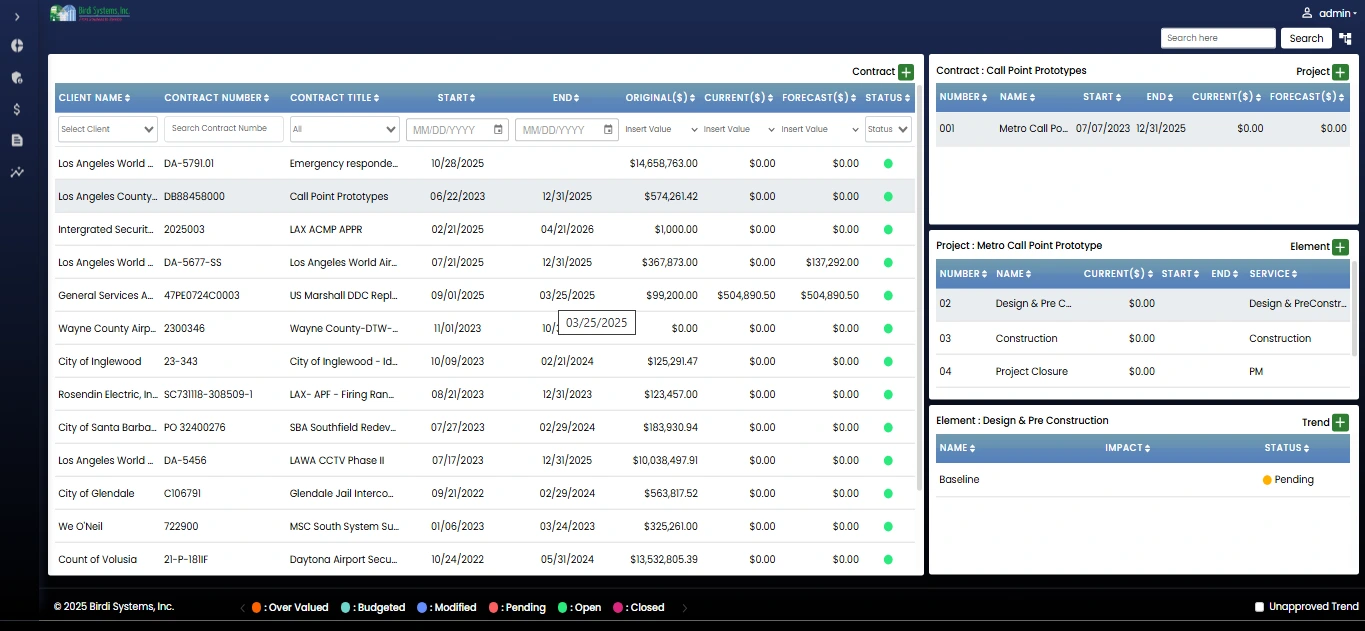
Birdi Systems
Capital project managementBirdi Systems needed a structured way to manage capital-project information across a portfolio rather than separating project plans, cost records, approvals and documents into disconnected workflows.
Softlabs built a completed capital project management software platform around a clear hierarchy: Contract → Project → Project Element.
This hierarchy allows users to begin with a portfolio or contract-level view and move into the project structures, schedules, budgets, actuals, forecasts, trends, approvals and documents relevant to their responsibilities.
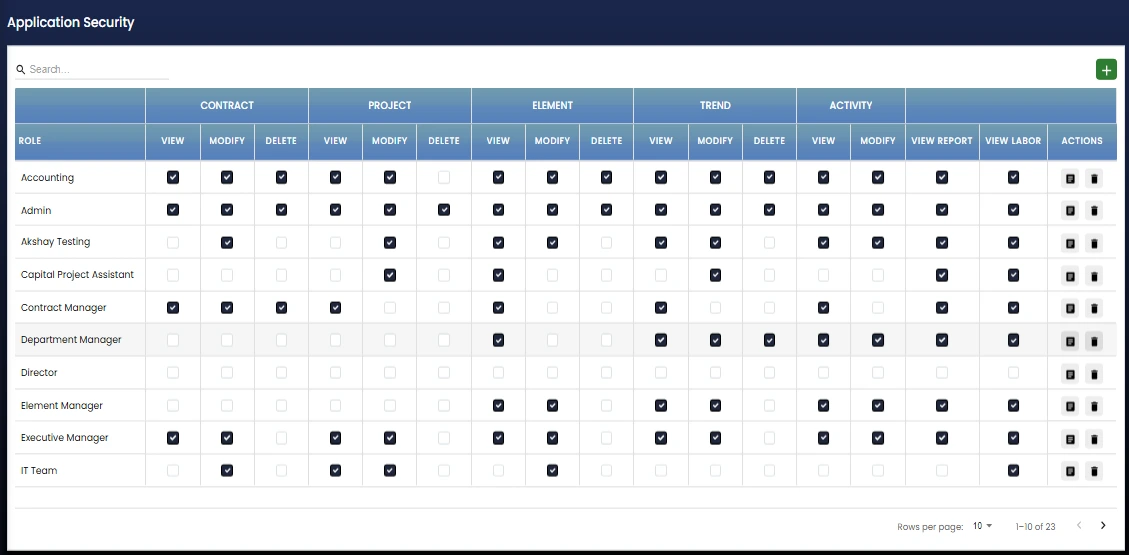
The application is role based. Super Admin, Admin, Accounting, and Project Managers/Operations can access the functions intended for their work. The software runs in a web browser and is best suited to desktop and laptop use. It is not designed for offline use.
Capital projects require financial and operational information to remain connected as work moves from initial planning into execution and reporting. Birdi Systems needed a system that could organize that information within one consistent project structure. The required platform needed to address four connected needs:
Teams needed to manage multiple contracts and projects while retaining the ability to inspect individual project elements. A flat project list would not provide enough context for complex project structures.
Project teams needed WBS-based planning, schedules, tasks and baselines to sit alongside the related financial records rather than operate as isolated planning data.
Accounting and operations users needed a capital project cost management system covering cost lines, budgets, markups or overheads, actual costs, forecasts and trends.
The system needed multi-level approvals, status records, audit history and documents at relevant levels so authorized users could review how project information progressed.
These requirements called for enterprise project controls software that connected portfolio navigation, project planning, financial control, approvals and reporting without reducing the project model to a single dashboard.
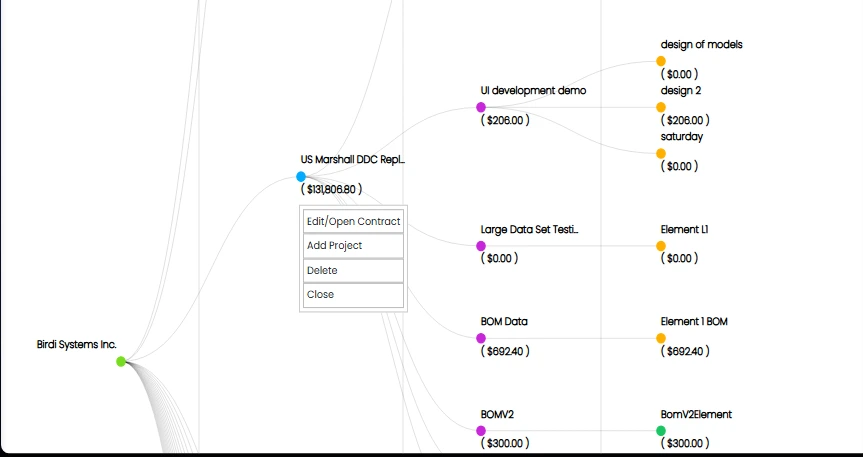
Softlabs built a centralized web portfolio and cost-management system for Birdi Systems. The platform organizes project data through the contract, project and project-element hierarchy and gives users two primary ways to explore that structure: a structured grid for direct review, and a mind-map-style graph for visual navigation. From this hierarchy, users can access the planning, scheduling, financial, approval, history and document records associated with the selected level.
The system includes:
This structure supports both portfolio-level oversight and detailed project control without separating schedule, cost and approval information from the project hierarchy.
Detailed How It Works
The application connects portfolio planning and financial control through a consistent project workflow.
OAuth2 supports application sign-in, while the system's roles determine which areas and actions are available to each user. Approval actions also use multi-factor authentication as part of the approval workflow.
Users can review the contract, project and project-element hierarchy through a grid or visual mind map. Selecting a contract, project or element provides access to the related records.
Users can organize work through work breakdown structures, project baselines, schedules, tasks and related project elements. DHTMLX Gantt supports schedule visualization, and Microsoft Project MPP import/export moves schedule information between systems.
WBS budget planning and cost-management functions connect planned and recorded financial information to the appropriate project structure: cost lines, budgets, markups and overheads, actual costs, forecasts and trends.
The capital project approval workflow supports multiple approval levels. Status records and audit history help preserve the sequence of project-control actions. Documents can also be attached at the contract, project, element and trend levels.
Budget-versus-actual dashboards and reports present financial information for project review. SSRS supports the application's documented reporting capability.
The product interface connects high-level financial review with the detailed cost information held inside each project structure.
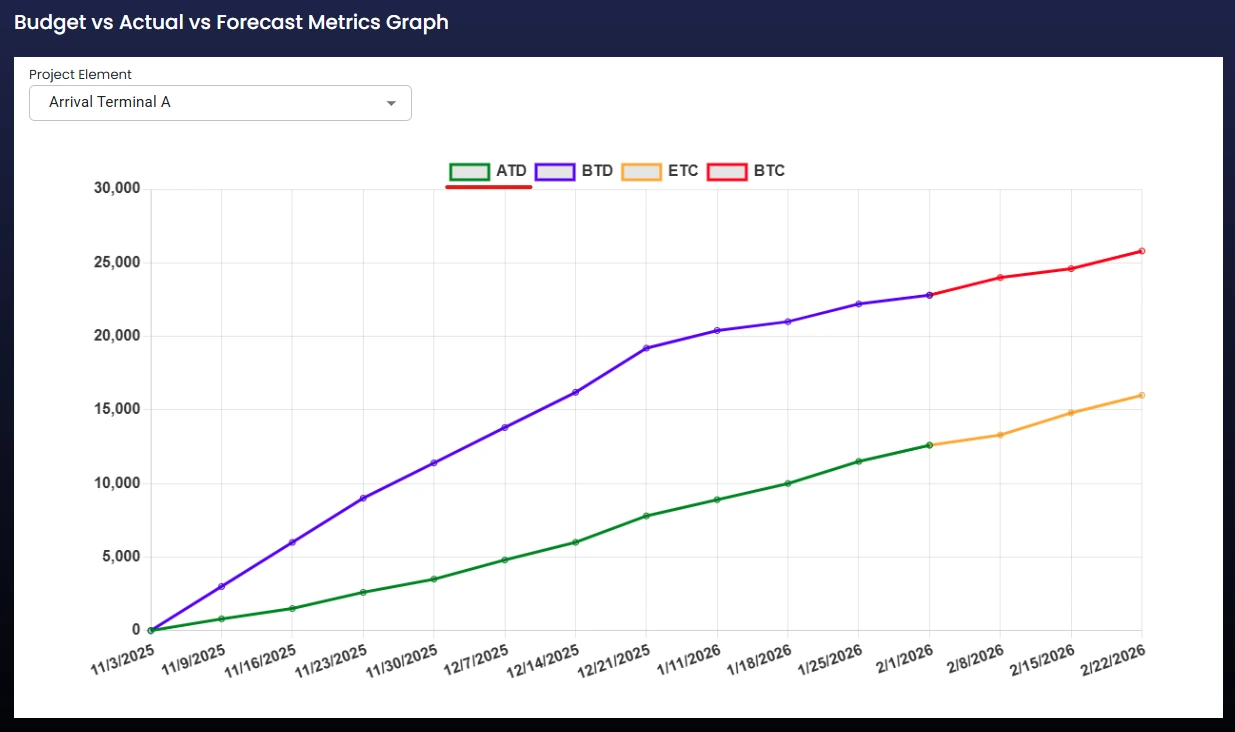
The budget actual forecast dashboard allows authorized users to compare key financial categories within the system. It supports project-control discussions by placing planned budget, recorded actuals and forecast information in a shared view.
The dashboard is a review and visibility tool, not evidence of real-time updates, automatic savings or improved forecasting accuracy.
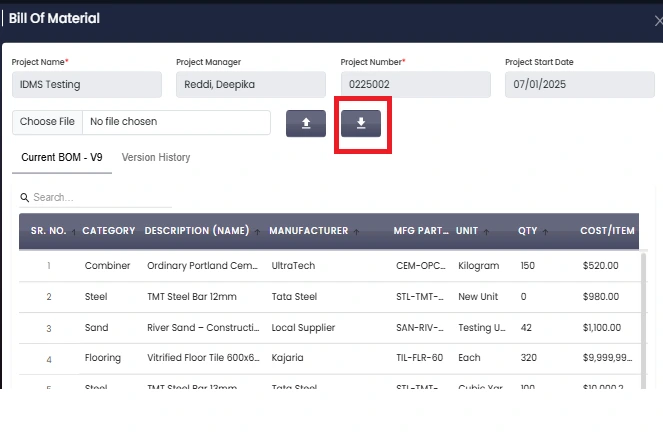
The system also supports detailed financial records such as cost lines and bill-of-material information. These records sit within the broader project hierarchy, allowing users to move from portfolio review into the cost detail related to a project or project element.
This detailed view complements the dashboards and reports by showing the underlying records used in project cost control.
Pain Points & Fixes
Presented as workflow coverage, not measured improvement.
Tap to explore each pain point
Project information can become disconnected.
The contract, project and project-element hierarchy gives portfolio, planning and cost records a consistent structure. Users can navigate this structure through both grid and mind-map views.
Schedule and cost data need shared context.
Baselines, WBS items, schedules and tasks are connected with cost lines, budgets, markups, overheads, actuals, forecasts and trends inside the same application.
Portfolio views can hide important detail.
Users can begin at the contract or portfolio level and move into an individual project or project element to inspect more detailed records.
Financial reviews need more than a single number.
The software provides budget-versus-actual dashboards and reports while retaining access to detailed cost lines, forecasts, trends and supporting records.
Approvals need defined steps and history.
Multi-level approvals, approval MFA, status records and audit history support controlled review and traceability within the application.
Supporting files can lose their project context.
Documents can be associated with contracts, projects, project elements and trends, keeping them connected to the relevant level of work.
Business data comes from multiple systems.
Documented integrations connect selected information from Birdi Timesheet, ADP and QuickBooks with the capital project management platform.
Pain Points & Fixes
Presented as workflow coverage, not as a measured improvement.
Project information can become disconnected.
The contract, project and project-element hierarchy gives portfolio, planning and cost records a consistent structure. Users can navigate this structure through both grid and mind-map views.
Softlabs completed a centralized capital project management platform that brings the documented project-control workflows into one role-based web application. The delivered system provides:
The completed platform gives Birdi Systems a shared software environment for project planning, portfolio review, cost control, approvals, documentation and reporting.
Ten capabilities across portfolio planning, financial control and governance.
3 features
Organizes information through contracts, projects and project elements, with both grid and mind-map navigation.
Supports WBS budget planning and project baselines within the project-control structure.
Provides schedules, tasks and Gantt-based visualization using DHTMLX Gantt.
3 features
Connects cost lines, budgets, markups and overheads to the appropriate project records.
Supports the review of actual costs, forecasts and project trends alongside planned financial information.
Provides budget-versus-actual dashboards and documented SSRS reporting for project and financial review.
4 features
Moves relevant records through defined approval levels, supported by approval MFA, statuses and history.
Retains status and audit information so authorized users can review the progression of project-control records.
Allows documents to be associated with contracts, projects, project elements and trends.
Supports Microsoft Project MPP import and export for schedule information.
The Birdi platform uses role-based access so users can work with the functions appropriate to their responsibilities. The documented roles are Super Admin, Admin, Accounting, and Project Managers/Operations.
OAuth2 supports application authentication. The system also uses multi-factor authentication for approval actions.
These controls support the application's role and approval workflows. No broader compliance or security certification claims should be inferred from this case study.
The underlying workflow is relevant to organizations that manage structured capital programs, detailed cost controls and multi-level project approvals. The exact configuration, integrations, approval levels and reports would depend on each organization's operating requirements.
The documented synchronization connects project job codes and labor actuals from Birdi Timesheet with the capital project management system.
The ADP integration synchronizes employee information used by the application.
The documented QuickBooks integration supports synchronization involving purchase orders, relevant master data and bills.
MPP import and export supports the exchange of project schedule information with Microsoft Project.
Softlabs develops custom project portfolio management software for organizations that need structured planning, cost control, approvals, integrations and reporting. Tell us how your contracts, project structures, budgets, schedules and approval workflows operate. We can help define and build a system around those documented requirements.
Discuss Your ProjectCapital project management software helps organizations organize the planning and control of capital work across project structures, schedules, budgets, actual costs, forecasts, approvals, documents and reports. The Birdi Systems platform connects these functions through a contract, project and project-element hierarchy.
Softlabs built a completed, role-based web application for capital project and portfolio management. It includes grid and mind-map navigation, WBS and baselines, schedules and tasks, budgets and cost lines, actuals and forecasts, trends, multi-level approvals, history, documents, dashboards, reports and Microsoft Project MPP exchange.
The system connects cost lines, budgets, markups, overheads, actual costs, forecasts and trends with the relevant contract, project or project element. Budget-versus-actual dashboards and reports give authorized users additional views for financial review.
Yes. The platform includes multi-level approval workflows, approval MFA, statuses and audit history. These features allow authorized users to review how relevant project-control records move through defined approval steps.
The documented integrations include Birdi Timesheet for job codes and labor actuals, ADP for employee synchronization, and QuickBooks for purchase-order, master-data and bill synchronization. The platform also supports Microsoft Project MPP import and export.
No. The system is a browser-based web application and does not provide offline use. It is best used on a desktop or laptop because its portfolio, schedule, financial and reporting views contain detailed project information.


