Custom Timesheet Management Software for Hourly and Salaried Teams

United States
Birdi Systems

Softlabs built a browser-based timesheet management system with role-specific work entry, leave controls, approvals and validated transfer to payroll.

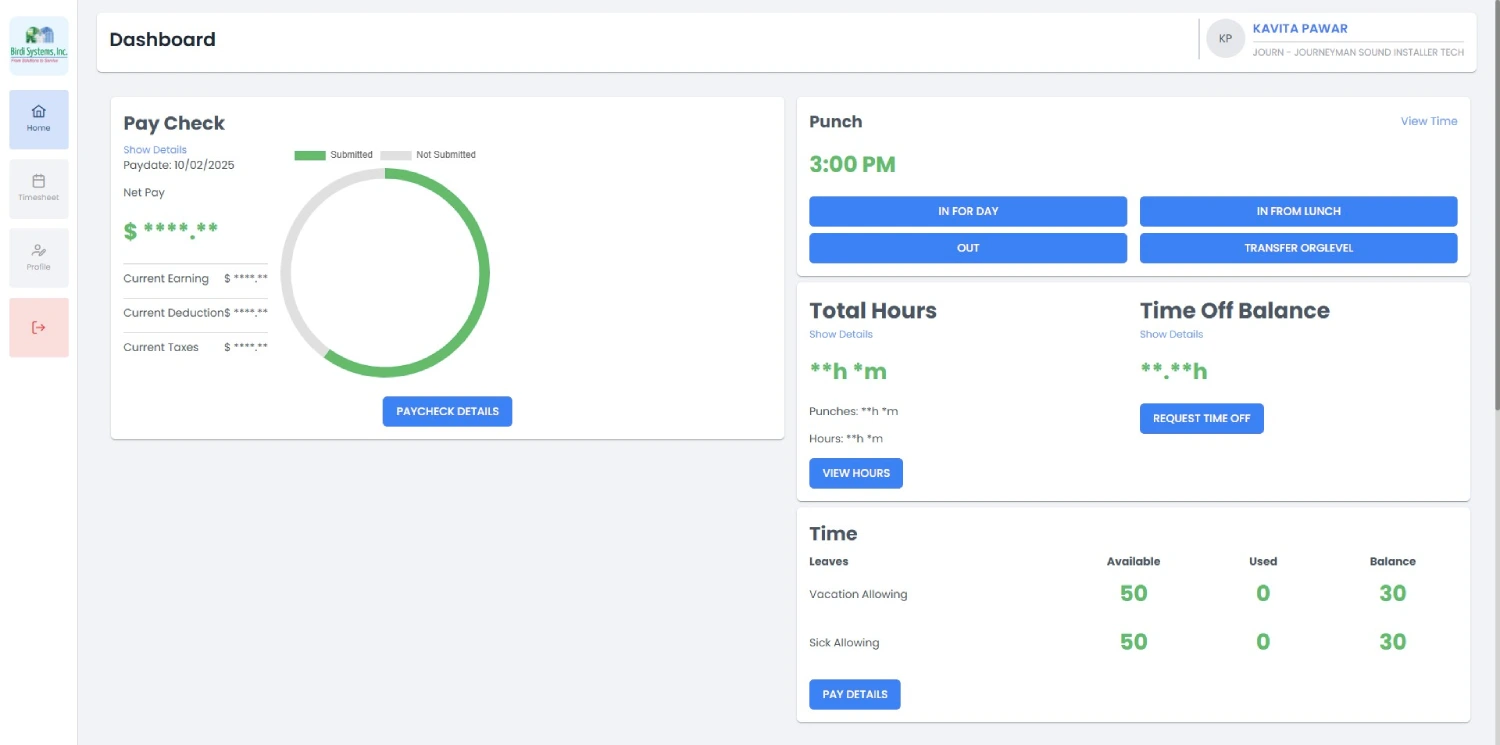
Birdi employee dashboard in the custom timesheet management software
Two entry methods
Punch-based and task-based work
Role-specific
Employee, supervisor, HR and admin
Leave connected
PTO, sick leave and approval checks
Payroll transfer
Only fully approved records advance

Birdi Systems

Workforce operations

Timesheet Management System

Completed
Solution
Custom timesheet software
Employee Types
Hourly BCI and Salaried BSI
Platform
Browser-based web application
Core Workflows
Time, approval, leave, payroll
The Client Brief

One System for Different Employee Types

Birdi Systems needed a central workforce time and attendance application that could support different employee types without forcing them into the same entry process.

Softlabs delivered a completed role-based browser application. Hourly BCI employees use punch-based attendance, while Salaried BSI employees record task-based work. Both continue through confirmation, review and payroll-ready validation.

Entry that fits the employee

Punch-based for hourly; task-based for salaried.

Sequenced approval

Employee, supervisor and HR/Admin validation.

Leave in context

PTO, sick leave, balances and unresolved requests.

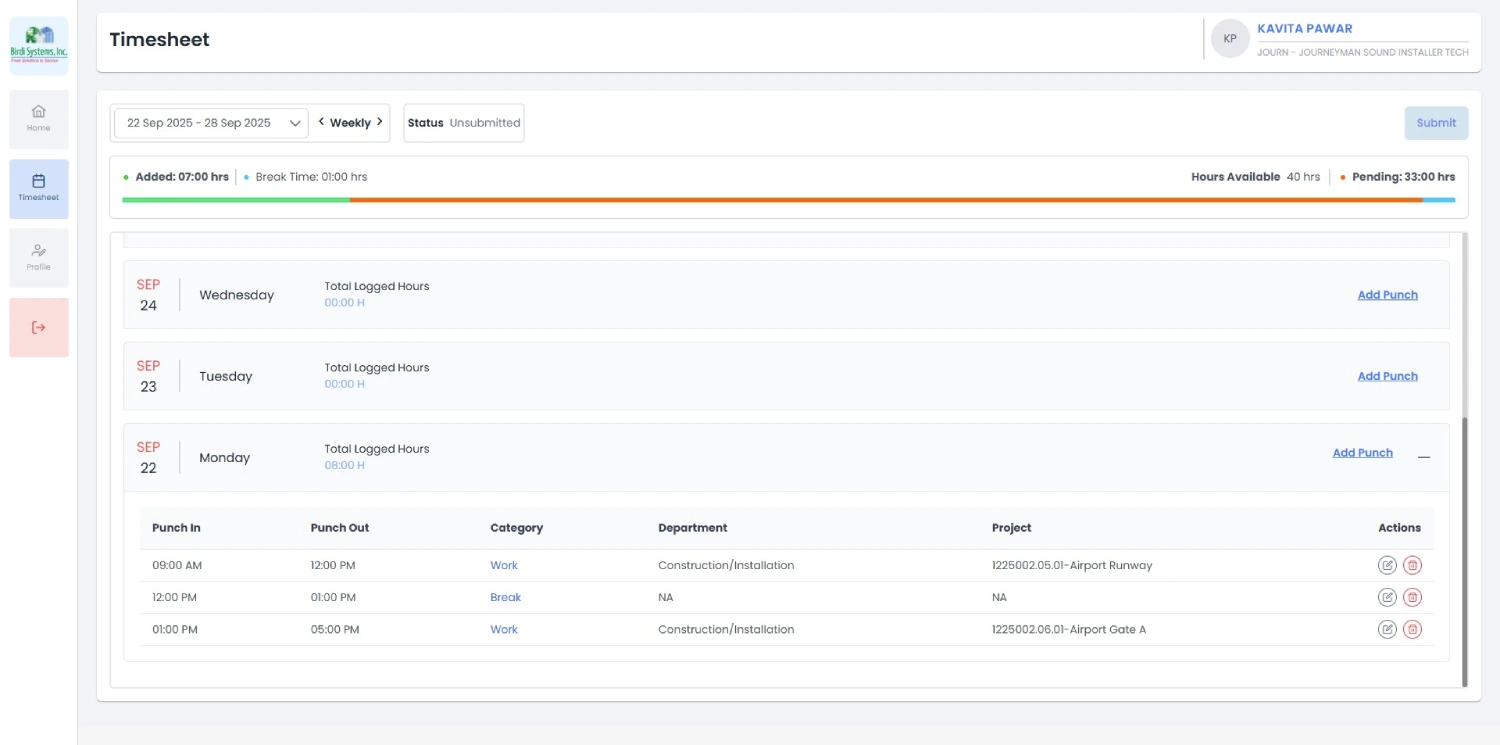
Weekly employee timesheet with daily entries and pay-period totals
Work entry, pay-period totals and status in one controlled employee view.
The Need

Why Did Birdi Need Custom Timesheet Management Software ?

Different employee types, several review levels, leave activity and payroll transfer had to work as one controlled process.

01

Different Employees Needed Different Entry

Hourly and salaried teams did not record work in the same way.

What the project needed

Give Hourly BCI employees punch controls and Salaried BSI employees task-based entries.
02

Approval Needed a Clear Sequence

Timesheets had to move through employee confirmation, supervisor review and HR/Admin validation.

What the project needed

Keep status and responsibility visible before a record can advance.

03

Leave and Payroll Could Not Sit Apart

Unresolved leave could affect validity, and payroll needed clean approved data.

What the project needed

Connect leave visibility to approval and transfer only fully approved records.

The Build

What Timesheet Management Software Did Softlabs Build ?

A role-based platform for work entry, employee confirmation, supervisor review, leave management, HR oversight and payroll transfer.

The platform supports punch in and punch out for Hourly BCI employees, multiple task entries for Salaried BSI employees, pay-period totals, PTO and sick leave, approval safeguards, final locking and validated transfer.

Birdi employee dashboard
Birdi weekly timesheet

Delivered scope

Time, leave, approvals and payroll-ready records

Employee Time Entry

  • Hourly punch tracking
  • Detected shifts
  • Salaried task entries
  • Multiple daily entries

Review & Approval

  • Pay-period totals
  • Employee confirmation
  • Supervisor approval
  • HR/Admin validation

Leave Management

  • PTO requests
  • Sick leave requests
  • Balances and accrual history
  • Unresolved leave checks

Controls & Integration

  • Status visibility
  • Final approval locking
  • Scheduled notifications
  • Payroll transfer

How It Works

The Timesheet Workflow , Step by Step

Step 01

Identify the Employee Workflow

Hourly employees see punch controls while salaried employees see task-based entries.

Step 02

Record Work

Punch activity connects to a shift, while salaried staff can add multiple task entries.

Step 03

Review the Pay Period

Entries, totals and current status are grouped for inspection.

Step 04

Approve and Submit

Employee confirmation is required before supervisor review.

Step 05

Supervisor Review

The supervisor approves or requests changes and checks unresolved leave.

Step 06

HR/Admin Validation

Authorised reviewers manage exceptions and complete final validation.

Step 07

Transfer to Payroll

Only fully approved records move to the connected payroll system.

Connected Workflows

The completed system combines employee time and attendance, leave management, approval controls and external payroll transfer in one role-based application.

01
Employee Workflow

How Do Employees Record and Submit Their Timesheets?

Hourly BCI employees use punch in and punch out actions with detected shifts. Salaried BSI employees add task entries and can create multiple entries for one day.

The pay-period view supports In Progress, Unsubmitted, Submitted and Approved statuses. After final approval, the record becomes locked and read-only.

Weekly employee timesheet with daily entries and pay-period totals
Employees review daily entries, weekly activity and pay-period totals before approving and submitting.
02
Supervisor Approval

How Does the Supervisor Timesheet Approval Workflow Work?

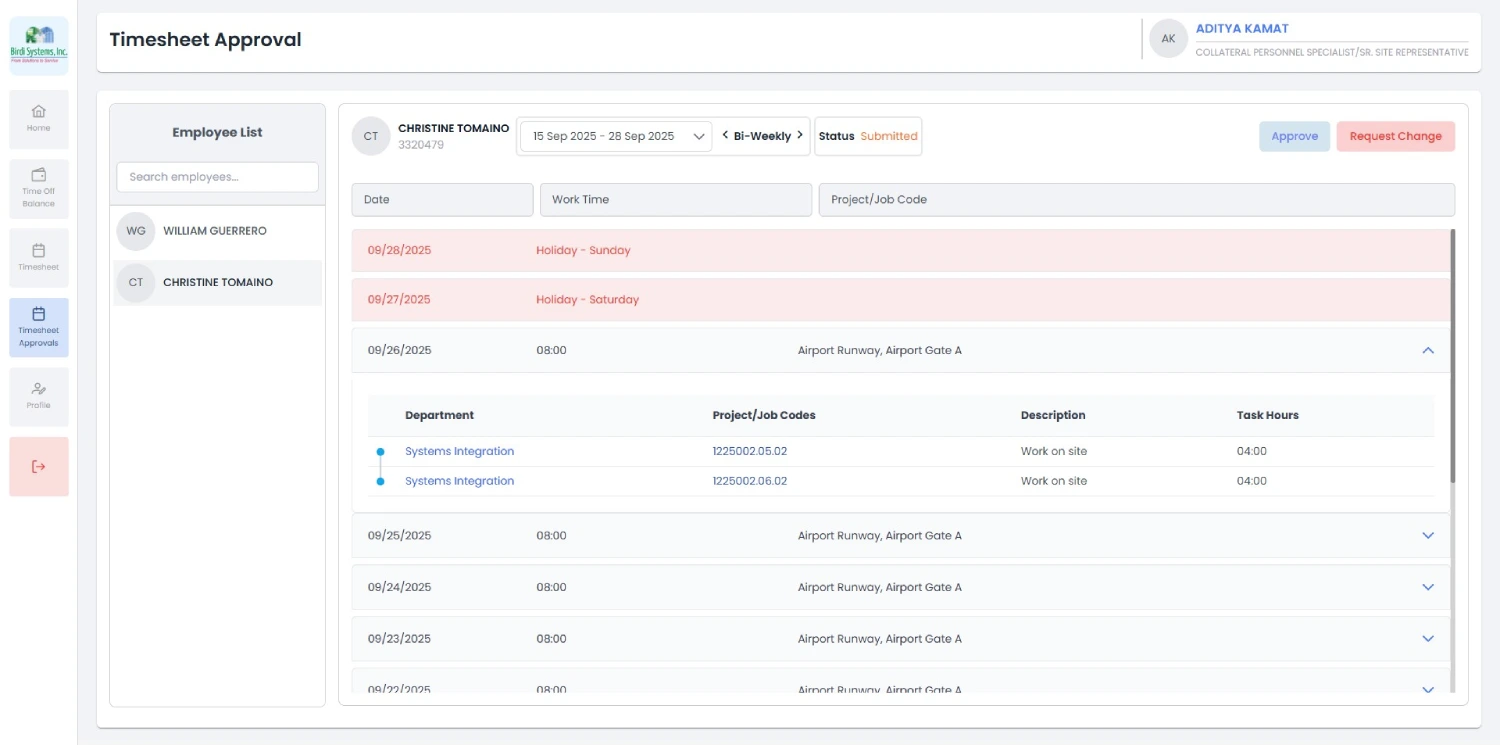
Supervisors review submitted records, check the employee’s entries and totals, consider unresolved leave and either approve or request changes.

The next controlled step stays visible so incomplete or unresolved records do not move directly to payroll.

Supervisor approval view for submitted employee timesheets
Supervisors review submitted timesheets and complete the next controlled approval step.
03
Leave Management

How Does Leave Management Work with Employee Timesheets ?

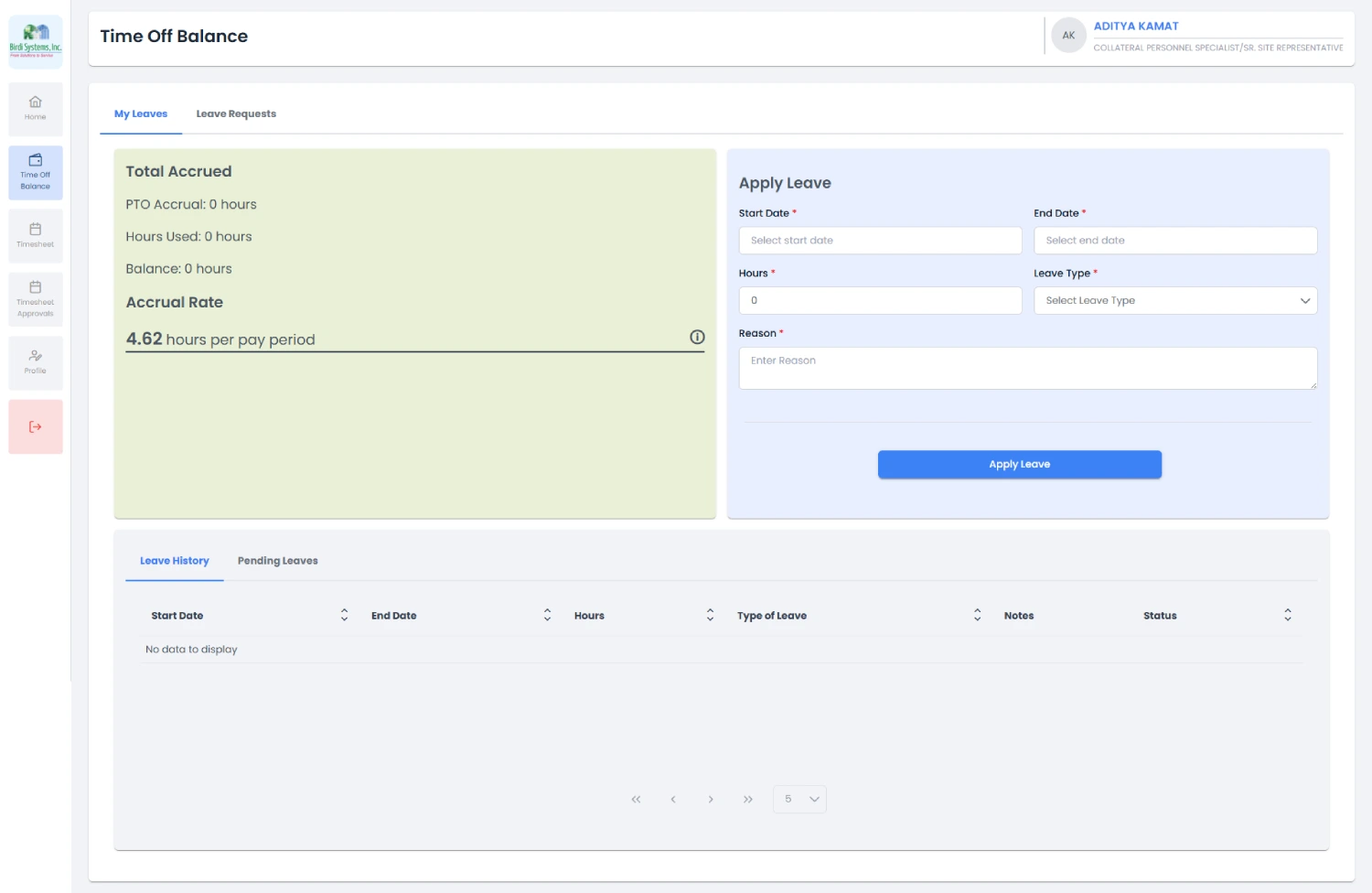
PTO and sick leave requests are recorded with balances and accrual history. Unresolved leave remains visible where it may affect approval.

Approval safeguards keep incomplete records from moving directly to payroll.

Employee time-off balance and leave request interface
Recorded balances, requests and accrual history connect leave activity with timesheet approval.

Problems & Fixes

Timesheet challenges. Practical answers.

Each workforce-time problem is paired with the delivered workflow response.

Tap to explore each challenge

Different employees

The challenge

Hourly and salaried employees required different methods.

The system’s response

Punch-based and task-based workflows coexist in one system.

Several daily work items

The challenge

Salaried staff may need to record more than one task in a day.

The system’s response

Multiple task entries can be added for one day.

Multiple review levels

The challenge

Employee, supervisor and HR/Admin checks needed sequencing.

The system’s response

Controlled approval stages keep responsibility visible.

Leave affects validity

The challenge

Unresolved leave activity may affect the record.

The system’s response

Leave status remains visible during approval.

Approved records should not change

The challenge

Final records needed protection from ordinary editing.

The system’s response

Final approval locks the record and makes it read-only.

Payroll needs clean data

The challenge

Incomplete data should not move to payroll.

The system’s response

Only fully approved records transfer to the connected payroll system.

Problems & Fixes

Timesheet challenges. Practical answers.

Each workforce-time problem is paired with the delivered workflow response.

Scroll to explore each challenge
01 / 06

Different employees

The challenge

Hourly and salaried employees required different methods.

The system’s response

Punch-based and task-based workflows coexist in one system.

The Outcome

One browser application. Every approval stage connected.

The completed platform brings work entry, leave, employee confirmation, supervisor review, HR/Admin validation and payroll-ready transfer into one controlled browser workflow.

Supervisor approval view
The application was designed to
support hourly and salaried employees differently
record punch-based and task-based work
sequence employee, supervisor and HR/Admin approval
keep leave activity visible during validation
lock records after final approval
transfer only fully approved records to payroll
Core Features

The right capabilities. Across every pay period.

Core features grouped by the part of the workforce-time workflow they support.

01

Time Entry

3 features

Hourly Punch Tracking

Punch in and punch out with detected shifts.

Salaried Task Entries

Task-based work records with multiple daily entries.

Pay-Period Totals

Entries and totals grouped for review.

02

Approvals

3 features

Employee Confirmation

Employees approve and submit their record.

Supervisor Approval

Supervisors approve or request changes.

HR/Admin Controls

Authorised reviewers manage exceptions and final validation.

03

Leave

3 features

PTO and Sick Leave

Requests connect to employee records.

Balances and Accrual History

Recorded balances and history remain visible.

Pending Leave Checks

Unresolved leave can be considered during approval.

04

Records & Payroll

3 features

Approval Locking

Final records become read-only.

Payroll Integration

Only validated records move forward.

Scheduled Notifications

Workflow notifications support follow-up.

Beyond one workforce. Built for mixed employee types.

A similar platform can suit organisations with mixed entry methods, controlled approvals, leave checks and payroll-ready transfer requirements.

The Stack

What Technologies Support the Timesheet System?

01
Frontend
React JS Browser interface
Redux Toolkit Application state
02
Application & API
.NET Core Microservices Backend services
REST APIs Application communication
Ocelot API gateway
03
Access & Workflow
JWT Access tokens
Multifactor Authentication Additional verification
Quartz Scheduled workflow jobs
04
Integrations
External Payroll System Approved record transfer
External Employee System Employee information

Need Custom Timesheet Management Software ?

Bring time entry, leave, approval controls and payroll-ready records into one role-based browser application shaped around your workforce.

Discuss Your Timesheet Workflow
Tell us about
Your employee types and roles
How each group records work
Your leave rules and balances
The approval sequence you need
Your payroll handoff
FAQs

Frequently Asked Questions

Answers about the delivered Birdi timesheet system and how its employee, leave, approval and payroll workflows connect.

What is custom timesheet management software?

A tailored application that matches an organisation’s employee types, entry methods, approval roles, leave rules and payroll handoff.

Can one system support hourly and salaried employees?

Yes. This system presents punch-based workflows for Hourly BCI employees and task-based entries for Salaried BSI employees.

How does approval work?

Employees confirm and submit, supervisors review, and HR/Admin completes required validation before payroll transfer.

How is leave connected?

PTO and sick leave requests, balances and unresolved activity are visible within the validation process.

Can approved timesheets transfer to payroll?

Yes. Fully approved records can transfer to the connected external payroll system.

Does it work on mobile or offline?

It is a browser-based system, primarily for desktop and laptop use. No native mobile app or offline capability is claimed.

DMCA.com Protection Status  © Copyright 2003 - 2026 Softlabs Technologies & Development Pvt. Ltd. All Rights Reserved.