



Step 01
Sign In and Load Assigned Information
An authorised user signs in, opens the dashboard and accesses content, activities, notifications and work made visible to that role.


 India
IndiaDesh Apnayen Sahayog Foundation needed a more structured way to manage civic-education activities across partner schools and field teams. The delivered mobile app brings activities, visits, evidence, notifications, rewards and role-based programme visibility into one system, with offline support for weak connectivity.
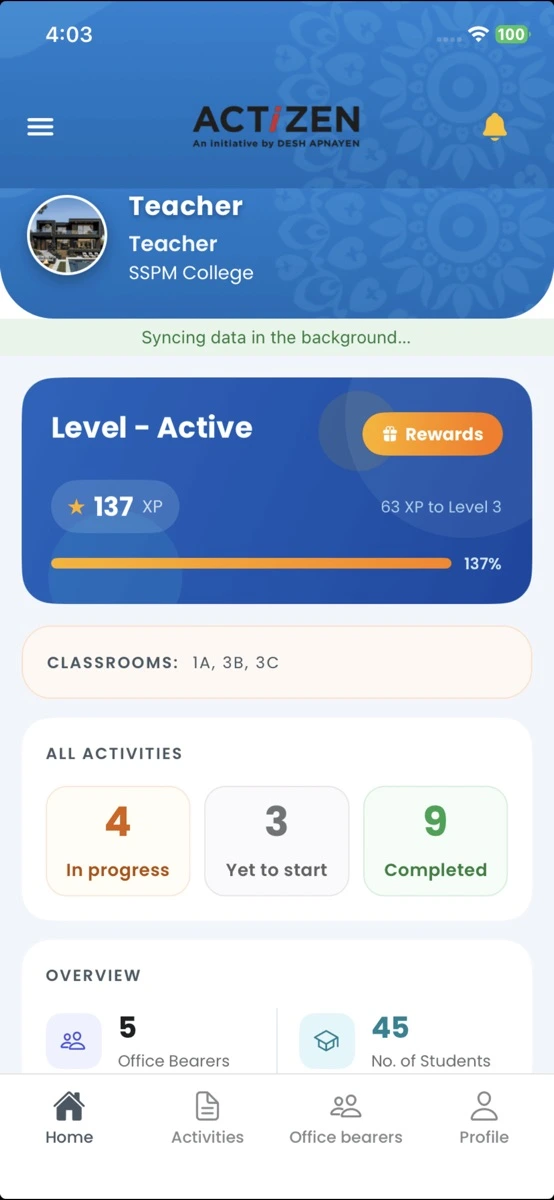
Desh Apnayen Sahayog Foundation
Education and nonprofit programme managementDesh Apnayen Sahayog Foundation works in civic education. Its programme helps teachers in partner schools across India access experiential activities, share feedback and submit success stories from their classrooms. The live App Store listing categorises Desh Apnayen as an education app and describes these teacher-facing programme workflows.
The wider operating model also involves field and leadership roles that need to coordinate activities, visits, supporting evidence and programme updates. These users do not all work in the same place or under the same network conditions, so the mobile workflow needed to support structured responsibility without assuming continuous internet access.
Phone calls, WhatsApp messages, paper records and separate spreadsheets make it difficult to maintain a consistent view of field activity. Desh Apnayen needed a system that could support:
The goal was operational structure, not a claim that every manual channel disappeared immediately. The available evidence does not provide measured reductions in paperwork, reporting time or messaging use.
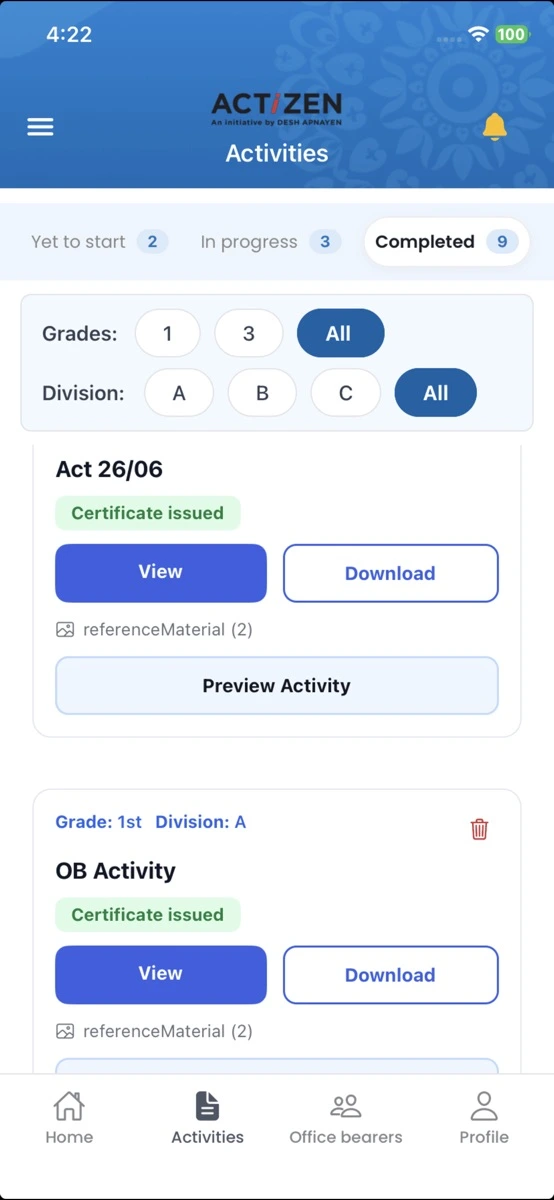
The delivered mobile app gives authorised users a role-based place to access their work, record programme activity and view information relevant to their responsibilities. The public App Store listing independently confirms login and password reset, profile management, a dashboard, notifications, offline support, structured activities and feedback.
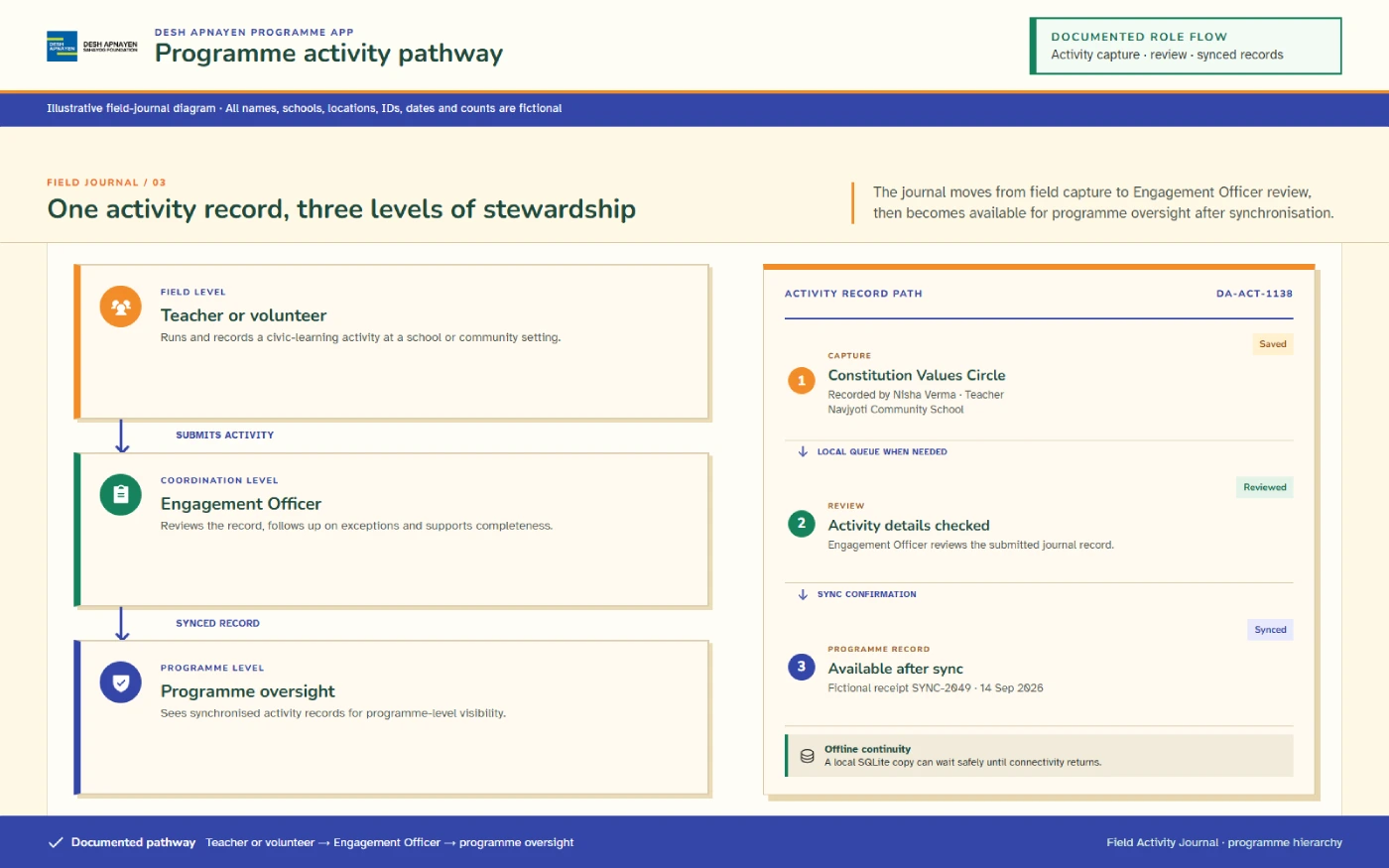
The app uses role assignment and hierarchical visibility so users can work with the records relevant to their responsibilities. Teacher, Volunteer and Community Resource Person roles use the app for programme participation without punch attendance. At higher levels, authorised programme leaders can see information submitted through the roles beneath their level.
This section describes functional role-based visibility. It does not claim a specific legal access-control model, named permission matrix or independently audited security standard.
Activity & Visit Workflow
An authorised user signs in, opens the dashboard and accesses content, activities, notifications and work made visible to that role.
The user can open activity details and supporting content before carrying out or documenting programme work.
Relevant users can add activity information, feedback, success stories and supported media such as photos or videos.
Field roles can create or update visit information and capture the evidence required by the documented workflow.
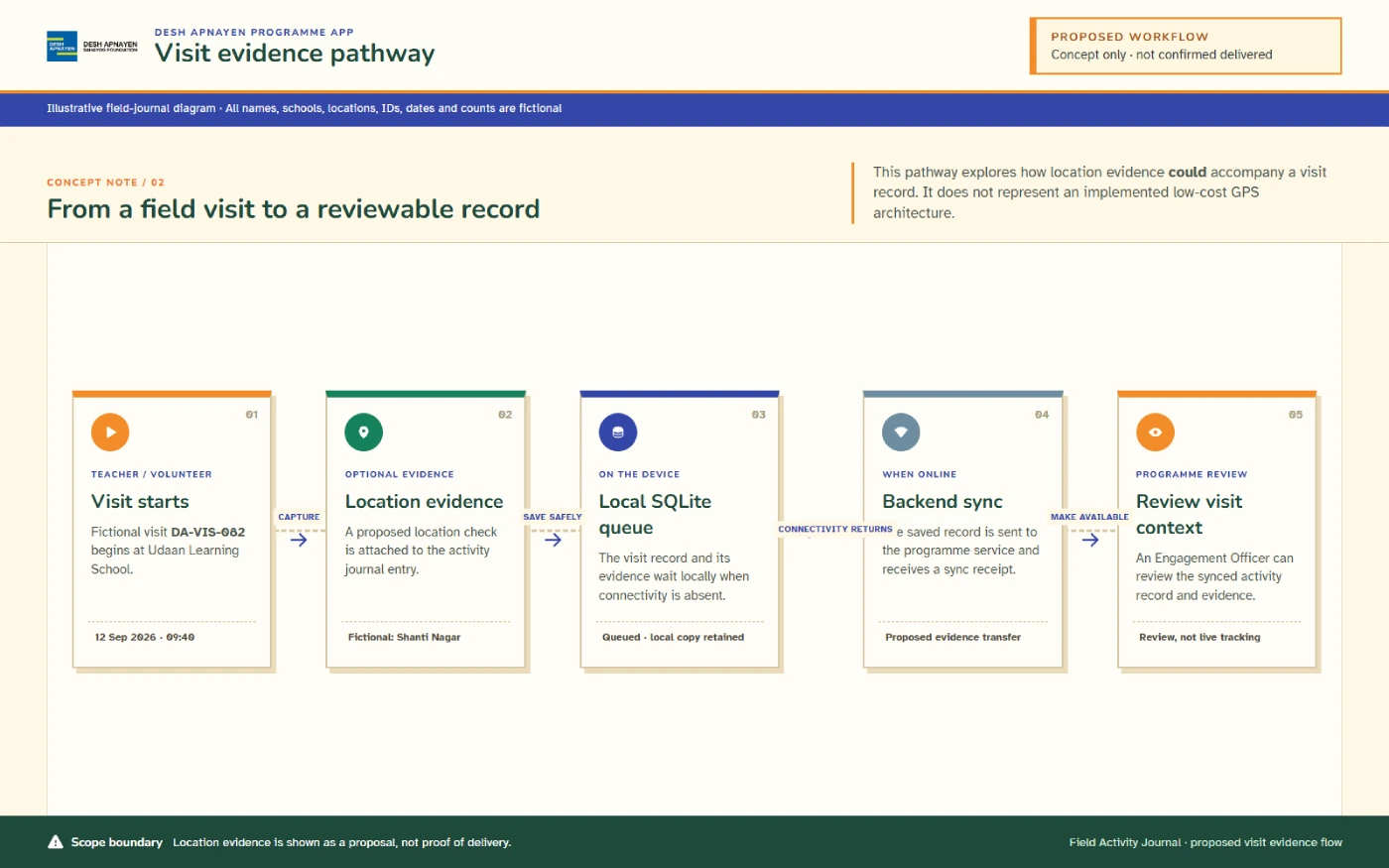
Supported records are stored locally and placed in a pending queue instead of requiring every action to reach the server immediately.
When the app is opened with internet access, connectivity returns, or an allowed background sync runs, the app pushes pending records and pulls available updates.
Authorised higher-level and leadership users can view programme information according to their assigned visibility.
Internet access may be weak or unavailable during school and field work. The documented mobile workflow uses local storage and a pending-sync queue rather than treating a live connection as a requirement for every action.
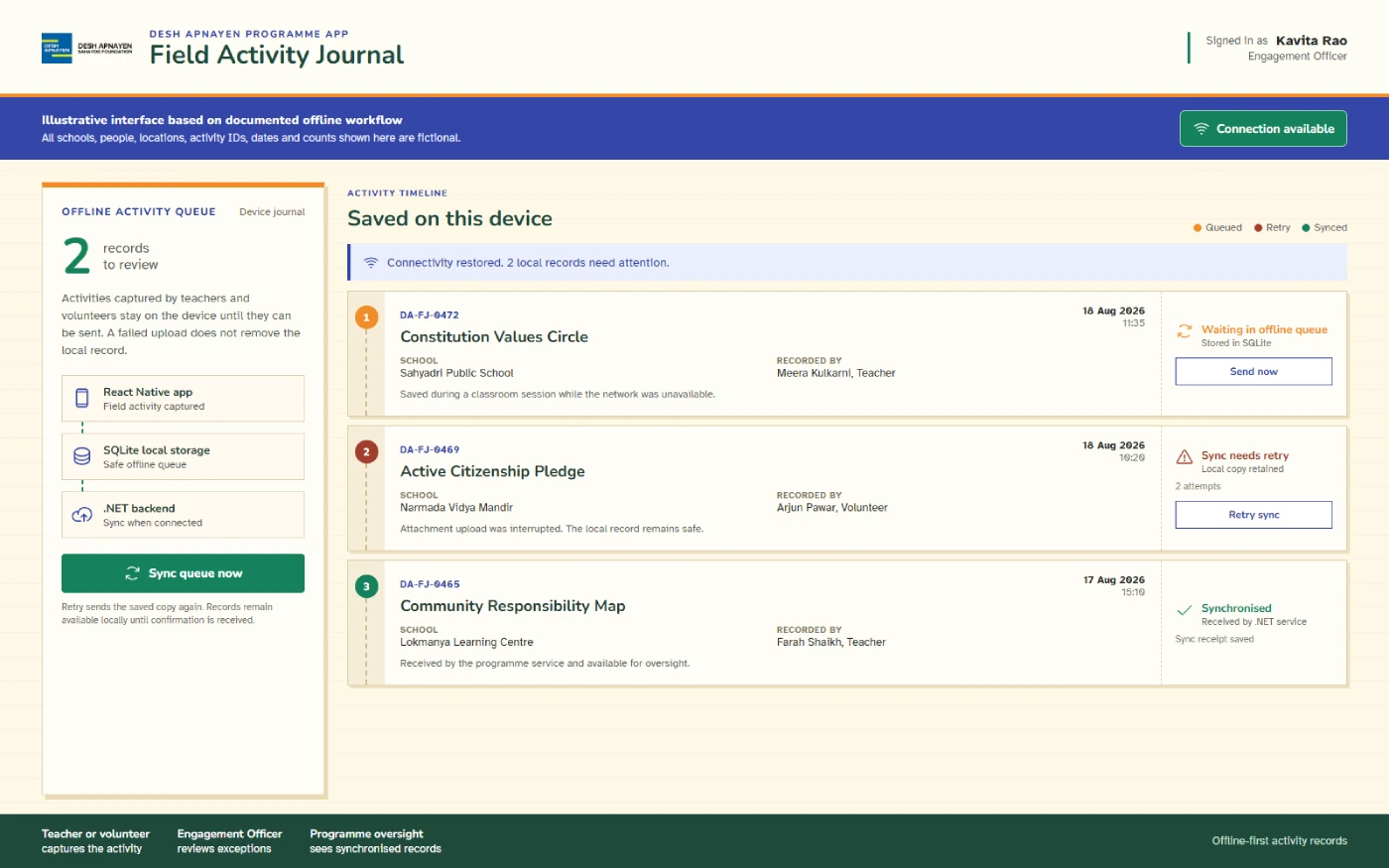
A user's first login authenticates the account and downloads the information needed for later offline use.
Supported forms, visits, photos and GPS information can be saved locally when the connection is unavailable.
Offline records are marked pending in the local SQLite store, documented to survive app closure and device reboot.
Opening the app online, connectivity returning, or an allowed background process pushes pending items and pulls updates.
Failed items retry with increasing delays; after up to five attempts, the item moves to review instead of silently failing.
The developer confirms that forms, visits, photos and GPS information can be captured offline and synchronised later. The recorded data can support visit, distance, time and payment calculations after it reaches the connected system.
Teachers, Volunteers and Community Resource Persons use the app without punch attendance. For Engagement Officers and other applicable operational roles, the documented sequence is:
Log in
Live photo & GPS
Punch in
Carry out work
Punch out
9 p.m. auto punch-out
Offline attendance is not claimed. The available records conflict on whether punch attendance works offline, so this case study does not claim offline punch-in, offline punch-out, later attendance synchronisation, biometric checking, liveness detection or guaranteed location accuracy.
The internal team tested the core features and programme workflows and reported positive feedback. No formal user-research score or public test report is available, so this feedback remains qualitative.
Delivered Mobile Scope
Twelve capabilities across access, field work and programme visibility.
4 features
Login, password-reset support and authorised access to the mobile application.
A central place for users to view their profile and role-relevant programme information.
Structured activities with details, photos, videos and supporting content for civic-education work.
Users can be assigned roles that determine the information and workflows available to them.
4 features
Mobile workflows for recording visits and relevant supporting information.
Local access to downloaded information and local saving of supported forms, visits, photos and GPS records.
Pending records can be pushed when a connection is available, with documented retry and review handling for failed items.
Location information can be captured offline and synchronised later for supported visit, distance, time and payment calculations.
4 features
Support for photos, videos, feedback, success stories and content-sharing workflows.
Alerts and programme updates available through the mobile application.
Views that help authorised users and leadership review programme information within the role hierarchy.
Points and rewards connected to the documented programme workflows.
The pending queue is designed to survive normal app closure and device reboot. However, locally stored unsynchronised records may still be at risk if the app is uninstalled, the device is damaged, or storage becomes unavailable.
Mobile operating systems can restrict background processing and GPS activity. A documented background workflow does not guarantee identical behaviour across every device, OS version or power-saving mode.
Battery use, weak satellite signals, indoor conditions and device-level restrictions can affect location availability and accuracy. Fake GPS is a documented risk; anti-spoofing controls are not confirmed.
Photos, videos, forms and pending records may increase device-storage use before synchronisation and cleanup.
Apple's listing says the developer has indicated that precise location, name, email address, photos or videos, and audio data may be collected, linked to the user and used for app functionality. Apple states that this privacy information has not been verified by Apple. See the privacy policy for details.
These are adjacent use cases for the approach, not claims that Desh Apnayen currently uses the app for every listed scenario.
We build role-based mobile systems for activities, visits, field evidence, offline work, notifications and programme reporting. Tell us how your teams work, which records must be captured and where connectivity creates operational gaps.
Discuss Your Field Programme AppA nonprofit field programme management app gives distributed teams one structured place to manage activities, visits, supporting evidence, notifications and reporting. In the Desh Apnayen project, the mobile app also uses role assignment, offline storage and higher-level visibility to support users working across programme and school contexts.
Supported offline use begins after a user completes the first login and initial download while online. A returning user can then access stored dashboard information and content, and save supported forms, visits, photos and GPS information locally. Pending records can synchronise later when a connection and the relevant app or background conditions are available.
Supported offline records are stored in a local SQLite database and placed in a pending queue. When the app opens online, connectivity returns or an allowed background sync runs, the documented workflow pushes pending items and pulls updates. Failed items retry with delays, and an item moves to review after up to five unsuccessful attempts. Synchronisation timing and completion are not guaranteed.
The confirmed mobile behaviour supports capturing GPS information with forms, visits and photos while offline, followed by later synchronisation. A broader architecture describes route planning, background GPS, school-radius checks and planned-versus-actual distance logic, but every detailed GPS rule or setting is not confirmed as deployed.
No. Teachers, Volunteers and Community Resource Persons use the app without punch attendance. Engagement Officers and other applicable operational roles have a documented workflow involving a live photo, GPS, punch-in, work and punch-out, with 9 p.m. automatic punch-out handling. Offline punch attendance is not claimed.
Issue Reporting is marked Coming Soon on the Apple App Store listing. Ticket management is a planned next module, not a delivered feature.


