



Copy calculation
Class and student totals
GVRS · Education Services · Netherlands · In progress
School Print Order Management Software
PrintPortal is a school-to-print shop ordering portal being built for GVRS. It is designed to replace fragmented email requests with a structured workflow for class copy calculations, PDF submission, print specifications and background FTP delivery.
Each finalised order is saved before the high-resolution PDF enters the FTP transmission queue.
Structured orders
PDF plus print specifications
Save before transfer
MySQL record precedes FTP
Background retry
Cron retries every five minutes
GVRS
Education services
PrintPortal School-to-Print Shop Order Management System
IN PROGRESS / Building
- Location
- Netherlands
- Example print shop
- Graffikka
- Core platform
- Django web application
- Solution type
- School-to-print shop ordering portal
- Delivery environment
- DirectAdmin / Alfahosting with Python Passenger WSGI
- Status
- IN PROGRESS / Building
A Clearer Route from School Request to Professional Printing
GVRS needed a web order system that could connect schools and professional print shops through one structured process. The existing workflow depended on teachers counting students, preparing print quantities, attaching large PDF files to emails and waiting for confirmation.
Print shops received separate messages with files and instructions that could be scattered or incomplete. PrintPortal is being built to bring order details, calculated copy quantities, print choices and PDF handling into one workflow.
From Fragmented Email Requests to Structured Print Orders
Old Way
- Teachers manually count students and requested extras.
- Large PDFs are attached to email messages.
- Print instructions can be split across text and attachments.
- Teachers wait for confirmation.
- Print shops receive scattered requests.
- Staff manually download files and follow up on missing details.
New Workflow Being Built
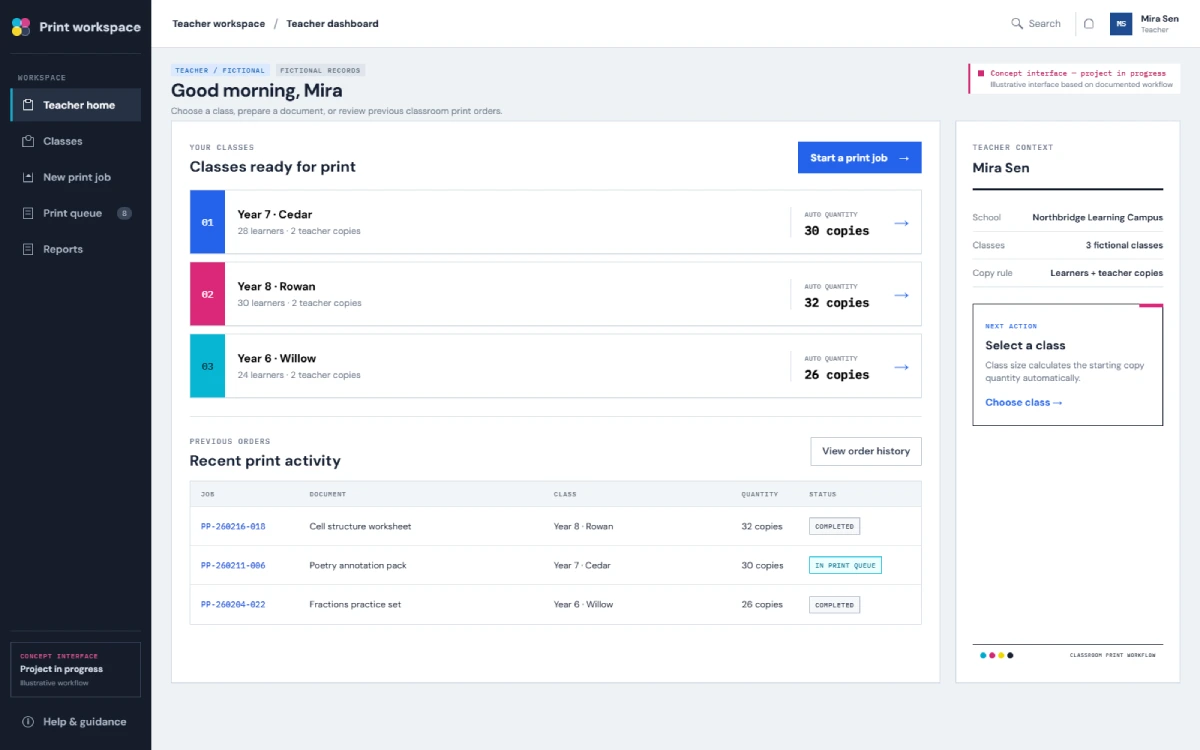
- Teachers select classes; student totals calculate base copies.
- Extras or a buffer can be included.
- PDF, colour mode, sidedness and delivery building stay together.
- Orders can be saved as draft or finalised.
- The final order is saved in MySQL before FTP is attempted.
- A background queue and five-minute cron retry keep FTP work off the submission screen.
This describes the workflow PrintPortal is designed to provide. It is not evidence of measured time savings, reduced waste, reduced support work or zero manual handling.
A Django Print Order System for Education Workflows
PrintPortal is being built as a Django-based school print ordering portal. It gives teachers a structured way to create orders while giving administrative and print shop roles a wider operational view.
The system combines class and grade data, student copy calculations, PDF upload, print specifications, order finalisation, background FTP transmission and email receipts.
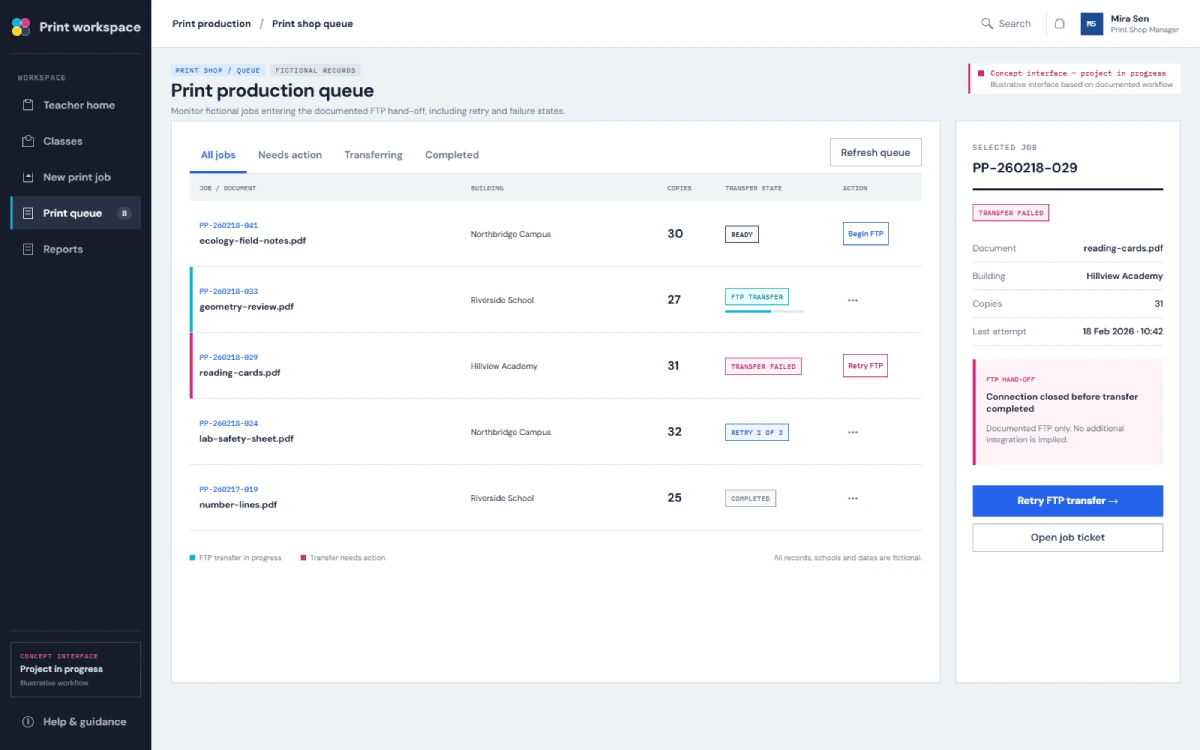
Teachers see their own orders. Superadmin and Print Shop Manager roles can view orders across classes, total print volume and FTP failure status.
How the School-to-Print Shop Ordering Portal Works
Step 01
Teacher Logs In
The teacher enters PrintPortal and can view the orders associated with their own teacher view. Authentication methods and password controls are not claimed.
Step 02
Teacher Selects Classes
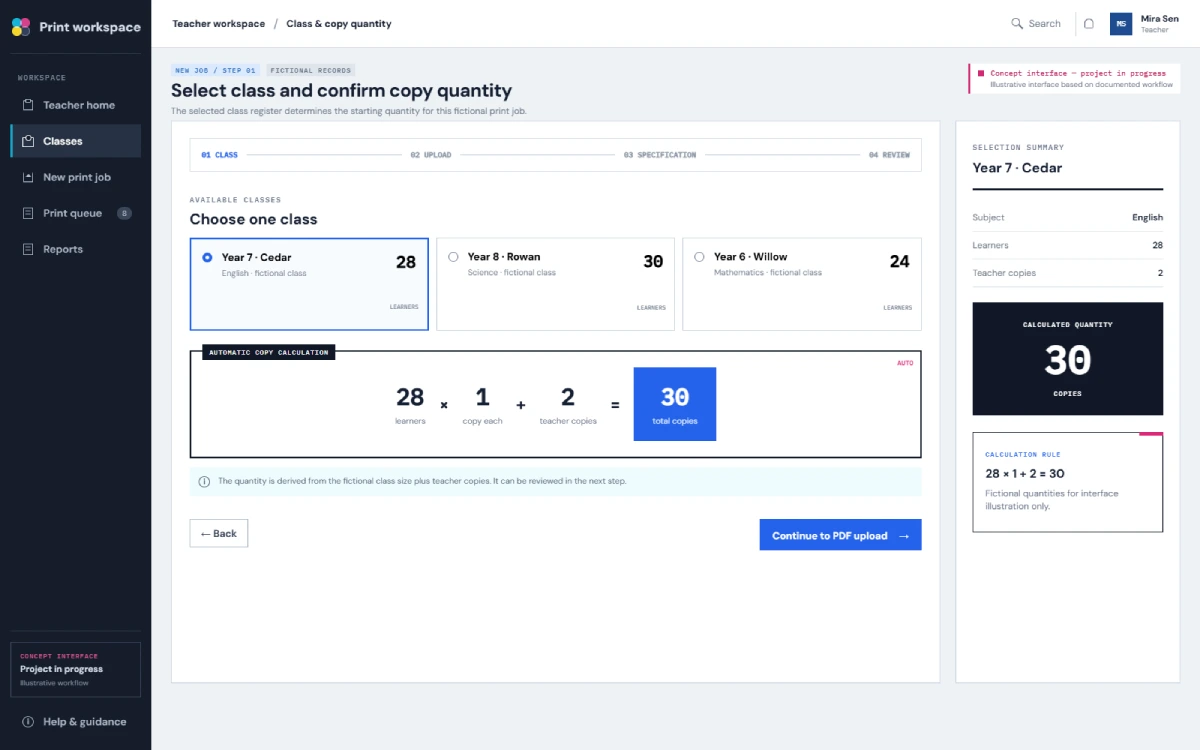
The teacher selects the classes covered by the request. Related student counts calculate the base number of copies.
Step 03
Copy Quantity Is Calculated
The calculation includes students in the selected classes. Requested extra copies or a buffer can also be included. No measured reduction in errors or staff time has been established.
Step 04
PDF and Print Specifications Are Added
The teacher uploads the PDF and selects Black & White or Colour, Single-Sided or Double-Sided, and the delivery building.
Step 05
Order Is Saved as a Draft or Finalised
A finalised order record is saved in MySQL before background FTP transmission is attempted.
Step 06
Successful Submission Is Recorded
Successful submission means the application accepted and saved the finalised order. It does not mean the PDF already reached the FTP server. Email receipts follow successful submission.
Step 07
PDF Enters the Background FTP Queue
The high-resolution PDF is queued for delivery using passive or active FTP. The teacher is not held on the submission screen.
Step 08
Failed FTP Attempts Are Retried
The saved order remains in MySQL. A background cron process retries the transfer every five minutes, and failure status can be shown for follow-up. Eventual delivery is not guaranteed.
Views for Teachers, Superadmins and Print Shop Managers
Teacher
- Creates draft and final orders
- Selects classes and calculates copies
- Adds extras or a buffer
- Uploads PDF and print specifications
- Chooses delivery building
- Sees their own orders
Superadmin
- Uses a cross-class dashboard
- Sees FTP failure status
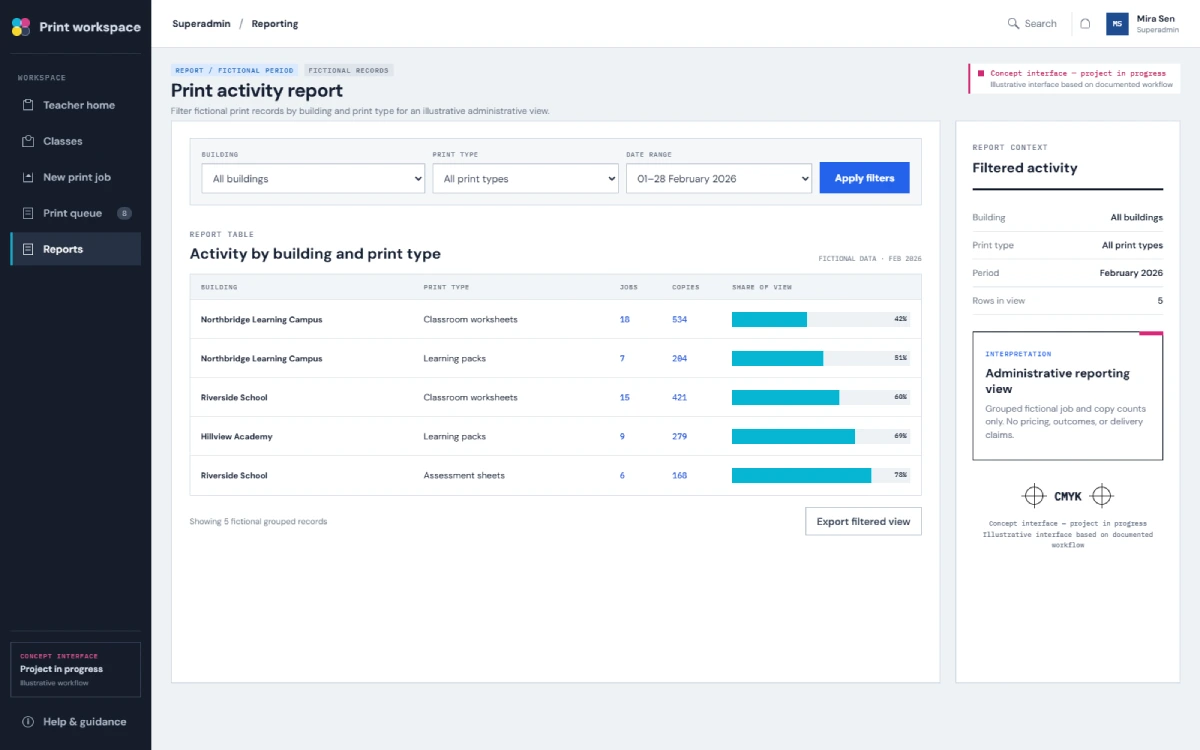
- Views total print volume
- Uses class and grade management modules
Print Shop Manager
- Uses a cross-class operational view
- Sees FTP failure status
- Views total print volume relevant to print operations
Approval, editing, deletion, audit-log and role-security capabilities are not confirmed for these views.
FTP Delivery Through Hosting Firewall Restrictions
The PrintPortal hosting environment introduced a practical constraint: firewall restrictions blocked direct FTP connections. The firewall has not been confirmed as removed, so the application cannot assume a high-resolution PDF will transfer successfully during submission.
Submit and save
- The teacher finalises the order.
- The order is saved in MySQL.
- Submission stays separate from FTP upload success.
Queue and transfer
- The PDF enters a background FTP queue.
- The queue can use passive or active FTP.
Retry and follow up
- If transfer fails, the saved order remains available.
- A cron process retries every five minutes.
- The user is not blocked while retries occur.
- Management views can show failure status.
Required technical boundary: The order is saved before background FTP delivery is attempted. If an FTP attempt fails, a cron process retries the transfer every five minutes without blocking the teacher’s order submission.
Modules Confirmed as Built
“Built” identifies modules confirmed in the current project. It does not mean the complete platform has launched, passed full user acceptance testing, reached production scale or completed all operational work.
- Draft order creation
- Final order creation
- Dynamic class and student copy calculation
- Teacher dashboard
- Superadmin dashboard
- Class management
- Grade management
- Background FTP transmission queue
- Automated email receipts
Testing Completed So Far
A school or print shop tested order generation and copy calculation successfully.
Evidence boundary
The available evidence does not identify the exact tester or establish full user acceptance, production-scale testing, FTP reliability at scale, live adoption or production deployment.
Designed Operational Value — Not Measured Results
These points describe intended operational value, not measured business results.
Structured Requests
PDF, class selection, quantity, print mode, sidedness and building stay together.
Clearer Copy Calculation
Student data supports base copies plus extras or a buffer.
Non-Blocking File Delivery
Saving first lets the submission complete without waiting for FTP.
Visible Transfer Exceptions
Management roles can see failures requiring follow-up.
No evidence is available for time saved, waste reduction, support reduction, error reduction, order volume, throughput, uptime, commercial results, adoption or reduced manual handling as an achieved result.
Core School Print Workflow Features
The broader PrintPortal project remains in progress while bringing the documented modules and operational workflow together.
Order creation
- School-to-print shop order creation
- Draft and final order handling
- Class and grade data management
- Student-based copy calculation
Print choices
- Extra copies or buffer calculation
- PDF upload and documented print choices
Operational visibility
- Teacher and cross-class dashboards
- Total print volume reporting
- FTP failure visibility
Delivery handling
- Passive or active FTP transmission
- Five-minute background retry
- Email receipts after successful submission
Where a Similar Print Ordering Portal Could Fit
These are potential use cases for a similar solution. They are not confirmed PrintPortal customers, deployments or integrations.
Technology Stack
01
Application
Python
Backend language
Django 6.0
Web framework
Django templates
HTML, CSS and JavaScript
02
Data & serving
MySQL
Database
DirectAdmin / Alfahosting
Hosting control environment
Python Passenger WSGI
Application serving
03
File delivery
Passive and active FTP
Print file transfer
Cron retry queue
Retries every five minutes
Have a similar ordering challenge?
Discuss Your Workflow
Need a Clearer Ordering Workflow Between Your Teams and Suppliers?
We build tailored web systems that turn email-based requests into structured operational workflows for education, document and print order processes.
Frequently Asked Questions
What is school print order management software?
School print order management software gives teachers or school staff a structured way to send print requests to a print shop. In PrintPortal, the documented workflow includes class selection, student-based copy calculation, PDF upload, print choices, delivery building selection and order finalisation.
How does PrintPortal calculate the number of copies?
The teacher selects the relevant classes, and the system uses their student counts to calculate the base number of copies. Requested extras or a buffer can also be included. A school or print shop has tested order generation and copy calculation successfully, although the exact tester and breadth of testing are not confirmed.
What print specifications can a teacher select?
The documented form lets the teacher choose Black & White or Colour, Single-Sided or Double-Sided printing and the delivery building. No other finishing, pricing, payment or file-rule options should be assumed.
What happens if the FTP upload fails?
The finalised order is saved in MySQL before background FTP delivery is attempted. If transfer fails or is blocked, a cron process retries every five minutes without blocking submission. This retry design does not guarantee eventual delivery.
Does an email receipt mean the PDF reached the print shop’s FTP server?
Not necessarily. Receipts follow successful order submission, meaning the application accepted and saved the finalised order. This remains distinct from confirmed FTP upload success.
Is PrintPortal live and fully deployed?
No. The project is in progress. Confirmed modules include draft and final orders, copy calculation, dashboards, class and grade management, the background FTP queue and email receipts. Full deployment, production-scale testing, adoption and commercial results have not been established.


