



Responsive website
Corporate content across screen sizes
Financial Services CMS Case Study · Completed
Investment Management Website CMS for NAMS Singapore
Nippon Life India Asset Management (Singapore) Pte Ltd needed a dedicated Singapore website and a central content management system for its offshore investment management business.
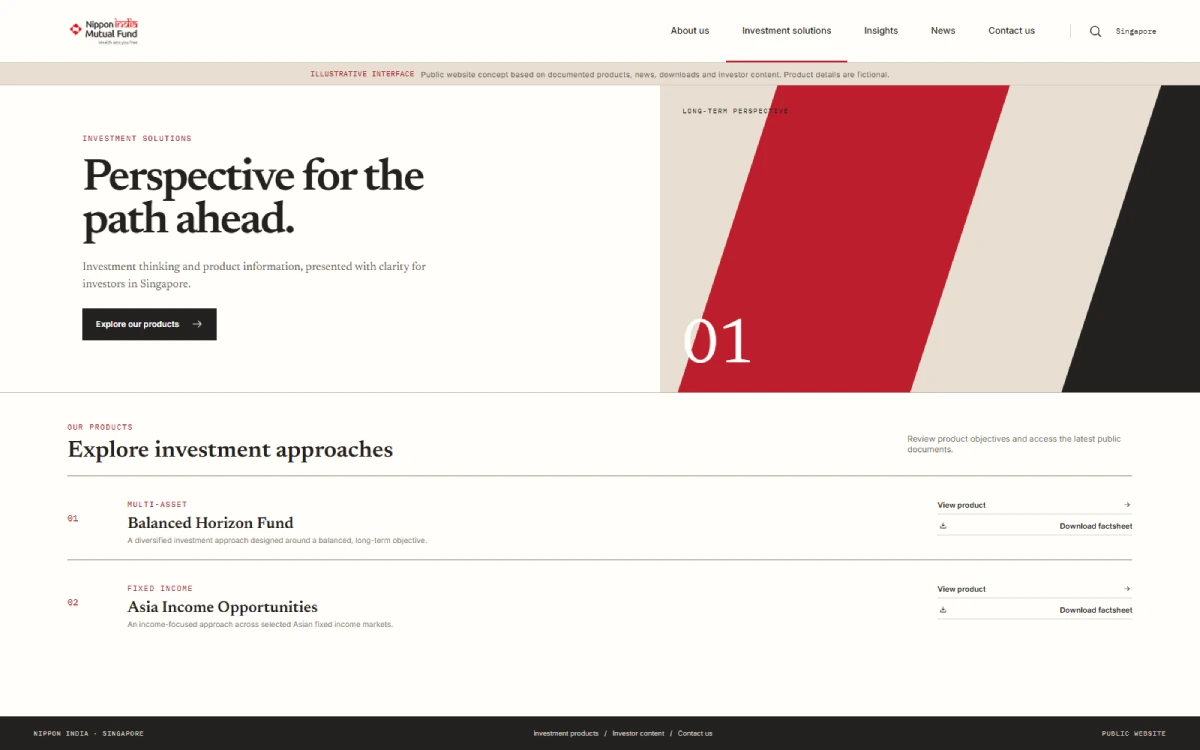
We delivered a responsive corporate website and CMS for managing products, news, downloads, team profiles, CEO Desk content and investor communications through a controlled draft-to-publish process.
Central CMS
Business-managed website content
Document repository
Current and historical materials
Human review
Draft, review and publish
NAMS Singapore
Investment management
Investment Management Website and CMS
Completed
- Client
- Nippon Life India Asset Management (Singapore) Pte Ltd
- Location
- Singapore
- Platform
- Responsive Web
- Project type
- Corporate Website and Content Management System
- Technology
- ASP.NET, C#, Microsoft SQL Server
- Status
- Completed
Supporting Global Access to Indian Investment Markets
Nippon Life India Asset Management (Singapore) Pte Ltd is the offshore investment management arm supporting global investment into Indian markets.
The Singapore business needed a dedicated digital presence that could explain its company, investment capabilities and products while giving visitors access to news, insights and investor documents.
The website also needed to support regular content changes without making the business depend on a developer for every banner, article, product update or document upload.
Equity
Fixed Income
Exchange-Traded Funds
Alternative Investments
Investment Advisory
Segregated Mandates
Why NAMS Needed a Central Website CMS
The previous static-site approach made regular updates difficult. Product information, documents, articles and investor communications could change frequently, but publishing those changes required technical support.
The project therefore required more than a public website. It needed a central content system that connected business-managed content with the live Singapore website.
A Dedicated Website and CMS for Investment Content
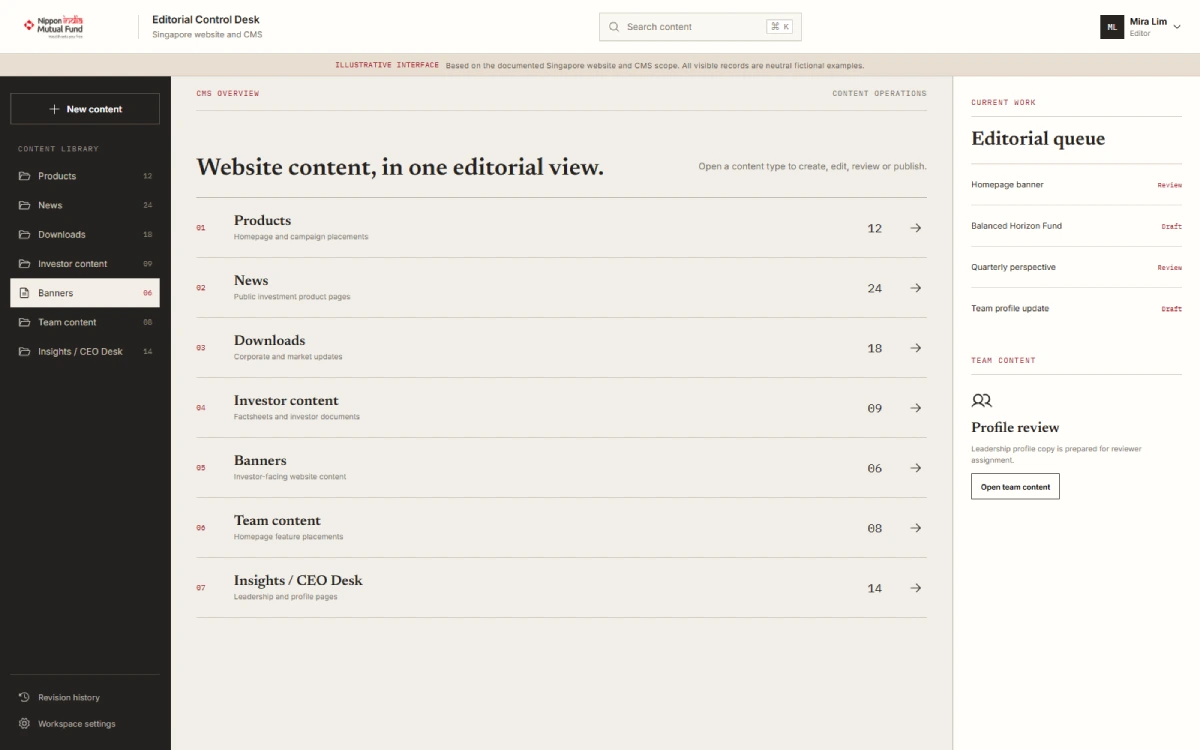
We delivered a responsive corporate website and a central CMS for NAMS Singapore. The public website presents the company, investment products, CEO Desk, News & Insights, team information and downloadable resources. The CMS gives authorised users the tools to create, update, review and publish the content shown across these areas.
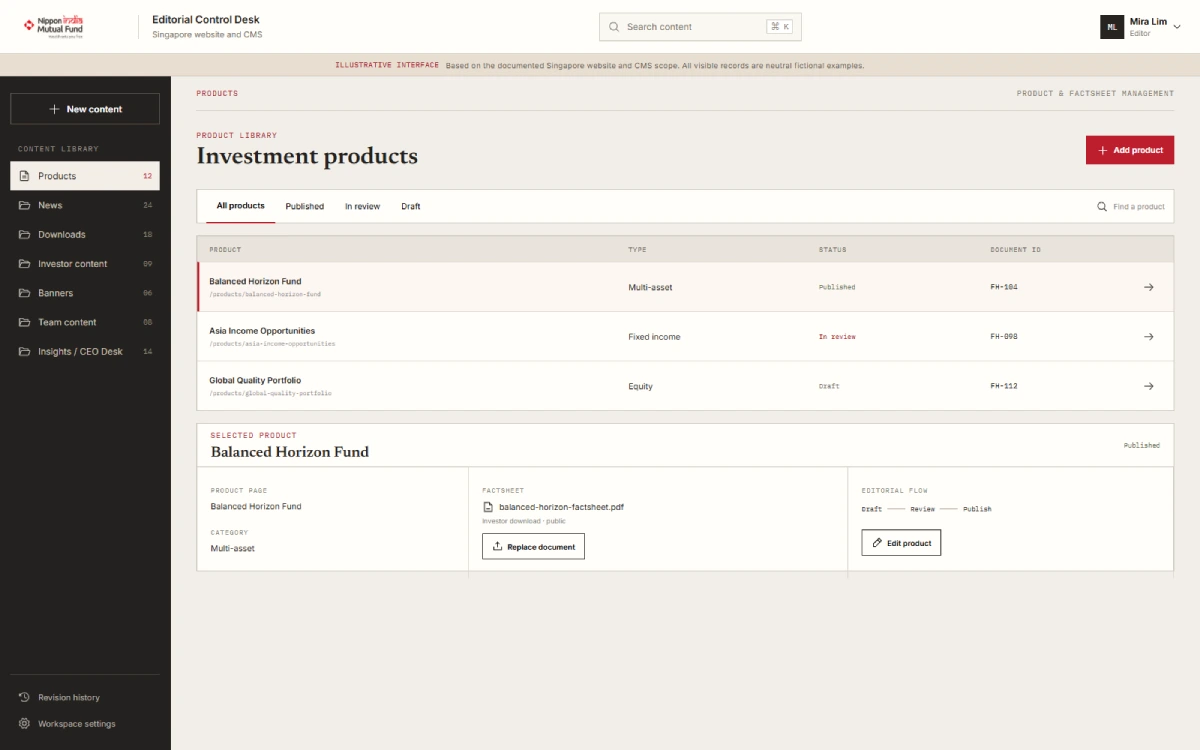
- Homepage banner management
- Investment product content
- News & Insights publishing
- Downloads and document repository
- Factsheet and attachment storage
- Team profile management
- CEO Desk content
- Contact Us form processing
- CMS user and administrator login
- Administrative user management
- Role-based access
- Draft, review and publish workflow
- User manual
- Technical documentation
The system was developed with ASP.NET application services and C#, supported by Microsoft SQL Server. SMTP was used for Contact Us processing. File storage supports website banners, factsheets, downloads and news attachments.
From Draft to Live Website Content
The documented CMS workflow gives editors a clear path from creating content to publishing it on the live website. It supports human review without claiming a fully automated approval system.
Step 01
Editor login
An authorised editor signs in to the CMS with a user account. Access is controlled through configured users and roles.
Step 02
Create or edit content
The editor opens banners, products, News & Insights, downloads, team profiles or CEO Desk, then creates a new item or updates an existing one.
Step 03
Add page details and files
The editor enters the required content and adds supported banners, downloadable documents, factsheets or news attachments.
Step 04
Save as a draft
The editor saves the work as a draft. Draft content is not treated as live website content.
Step 05
Review the content
The draft is checked before publication. The documented process includes review, but the exact permission matrix and reviewer roles are not publicly documented.
Step 06
Publish live
After review, the content is published to the live website and appears through the relevant public section.
Step 07
Maintain current and historical content
Business users can continue to manage active content and organise historical investor documents as the website grows.
Investor Content and Document Management
Investment management websites need a clear way to publish changing product information and organise documents that investors may need to find later.
The NAMS CMS gives business users one content environment for maintaining investor-facing materials instead of treating each website update as a separate development task.
The document repository helps keep downloads organised as the volume of content grows. It also supports continued access to historical material where the business chooses to retain and publish it.
This describes content and document organisation only. It does not claim regulatory compliance, automated retention rules, investor authentication or a private investor portal.
Investment product pages
Factsheets
Investor documents
Current documents
Historical documents
News and insights
Article attachments
CEO Desk communications
Banners and media
Website Management Problems
Addressed by the CMS
Each website-management problem is paired with the delivered CMS response.
Tap to explore each problem
Technical support dependency
The problem
Routine content changes depended on technical support.
The CMS response
A central CMS lets authorised business users manage supported website content.
Regular content updates
The problem
Product and company content needed regular updates.
The CMS response
Dedicated management areas support products, banners and corporate content.
News and articles
The problem
News and articles were difficult to maintain on a static site.
The CMS response
News & Insights publishing supports articles and related attachments.
Investor downloads
The problem
Investor downloads needed clearer organisation.
The CMS response
A document repository supports factsheets, downloads, and current and historical materials.
Review before publishing
The problem
Content needed a review step before going live.
The CMS response
Editors can create or edit content, save a draft, review it and then publish it.
Team and leadership content
The problem
Team and leadership content could become outdated.
The CMS response
CMS modules support team profiles and CEO Desk content.
Administrative access
The problem
User access needed administrative control.
The CMS response
The delivered CMS includes user management, login and role-based access.
Contact enquiries
The problem
Contact enquiries needed website processing.
The CMS response
The Contact Us form uses SMTP-based processing.
Website Management Problems
Addressed by the CMS
Each website-management problem is paired with the delivered CMS response.
Technical support dependency
The problem
Routine content changes depended on technical support.
The CMS response
A central CMS lets authorised business users manage supported website content.
Reported Value for the NAMS Content Team
The completed website and CMS gave NAMS Singapore a dedicated digital presence and a more manageable way to maintain its public content. These are reported operational benefits; no publishing-time, traffic, conversion, engagement or SEO metrics are available for public use.
Less developer dependency
Routine supported updates can be managed by authorised business users.
Faster supported publishing
Content can move through a defined publishing path.
Defined governance
A draft, review and publish process supports human checking.
Organised documents
Investor materials can be maintained in a central repository.
Maintainable content
Products, articles and corporate information share one environment.
Investor engagement support
Public content and downloads remain easier to access.
Scalable structure
The content model supports future website growth.
Core Features of the Investment Management Website CMS
01
Website Content
5 features
Banner Management
Business users can maintain website banners and supporting files.
Product Management
Investment product content across the business areas presented by NAMS Singapore.
News & Insights
Editors can update articles and add supporting attachments.
Team Management
Authorised users can maintain team profiles without code changes.
CEO Desk
Leadership communications published through the CEO Desk section.
02
Documents & Enquiries
3 features
Download Repository
Factsheets, downloads, investor materials and historical documents.
Contact Us Processing
Website enquiries processed through an SMTP-supported flow.
File Management
Storage for banners, documents, factsheets and news attachments.
03
Publishing & Access
2 features
Draft-to-Publish Workflow
Creation or editing, draft, human review and live publication.
Users and Roles
CMS user administration and role-based access.
04
Delivery
2 features
Responsive Public Website
Corporate content across desktop, tablet and mobile screen sizes.
Documentation
A user manual and technical documentation support operation and maintenance.
Where a Similar Financial Services CMS Can Be Used
These are relevant applications of a similar platform, not claims that this exact implementation is an off-the-shelf product.
Technologies and Delivered Capabilities
01
Application
ASP.NET
Application services
C#
Application development
Responsive UI
Cross-screen website
02
Data & files
Microsoft SQL Server
Application data storage
File storage
Banners, factsheets and attachments
03
Access & communication
User and admin login
CMS administration
Role-based access
User access management
SMTP
Contact Us processing
04
Handover
User manual
Business-user guidance
Technical documentation
Operation and maintenance support
The Singapore Website Is Live
The public website currently shows sections for the company, products, CEO Desk, News & Insights, team and downloads.
Visit the NAMS Singapore Website
Live frontend evidence
Evidence boundary: The live frontend supports the statement that the dedicated Singapore website was delivered and remains publicly accessible. Public pages do not, by themselves, verify the current internal CMS architecture, user permissions, backend technology or administrative workflow.
Have a similar content challenge?
Discuss Your CMS Project
Need a Website CMS for Financial or Investor Content?
We build custom websites and content management systems for financial services businesses that need to manage products, news, documents and corporate information through a clear publishing process.
Frequently Asked Questions
What is an investment management website CMS?
An investment management website CMS is a content management system designed to help an investment business maintain its public website. It can support product pages, news, insights, factsheets, investor downloads, team profiles and corporate communications from one managed environment.
What did the NAMS Singapore CMS allow business users to manage?
The delivered CMS supports banners, investment products, News & Insights, downloads, factsheets, team profiles, CEO Desk content and other investor communications. It also includes user administration and role-based access.
How does the NAMS draft-to-publish workflow work?
An authorised editor logs in, creates or edits content, adds required files, saves the content as a draft, sends it through human review and publishes it to the live website. The exact reviewer roles and permission matrix are not documented for public use.
Can the CMS manage current and historical investor documents?
Yes. The delivered document repository supports the organisation of current and historical investor materials, including factsheets, downloads and attachments. The public case study does not claim automated retention or compliance rules.
Which technologies were used for the project?
The documented technology stack includes ASP.NET application services, C# and Microsoft SQL Server. The solution also uses SMTP for Contact Us processing and file storage for banners, factsheets, downloads and news attachments.
Does this case study include an investor portal or automated approval system?
No. The delivered scope described here does not include a private investor portal or a fully automated approval workflow. Advanced analytics, automated publishing, multilingual content, enhanced reporting, API integrations and mobile app integration are also not presented as delivered features.


