



Onboarding
Validated multi-role workflow
Identity Lifecycle Management Case Study · Completed
Employee Identity Lifecycle Management System
NOPLMT is a completed employee identity lifecycle management platform developed for Nippon India. It replaced email, spreadsheets and physical-paper tracking with one web-based workflow for employee onboarding, access approvals, recertification, renewal and offboarding.
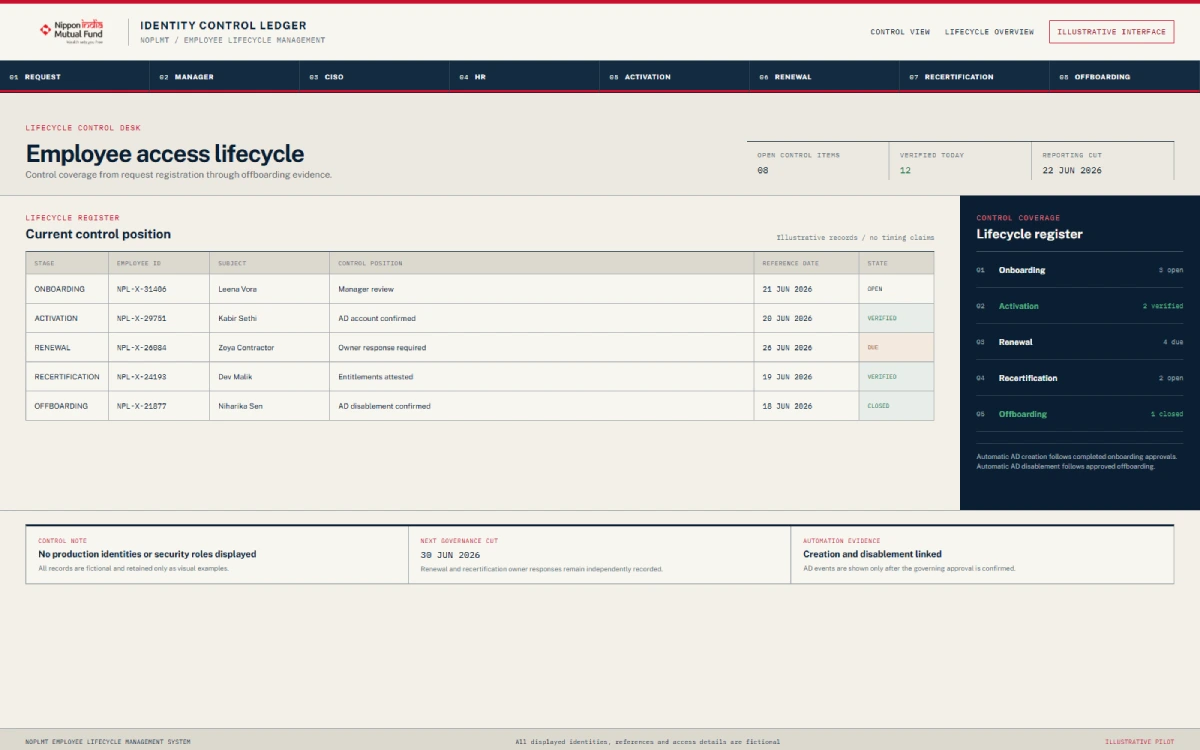
The platform connects Manager, CISO, HR and Active Directory activities in a controlled process. Only approved users move through onboarding, while later lifecycle decisions remain recorded and auditable.
Access reviews
Recertification and renewal
Offboarding
Recorded disablement flow
Lifecycle records
Reports and audit logs
Nippon India
Financial Services / HR Technology
Employee Identity Lifecycle Management
Completed
- Location
- India
- Solution
- Employee Identity Lifecycle Management
- Frontend
- React.js
- Backend
- .NET Core 8.0
- Directory
- Active Directory
- Status
- Completed
Bringing Employee Access Activities into One Platform
Nippon India required a central system for managing important employee identity activities across several internal teams. The earlier process relied on email, spreadsheets and physical paperwork to track requests, approvals and account-related actions.
NOPLMT, short for New Onboarding Platform Lifecycle Management Tool, was developed as a web portal that brings these activities into one structured workflow.
Replacing Manual Employee Access Tracking
The previous process required teams to coordinate through emails, spreadsheets and physical documents. This made it harder to see where a request was waiting, which approval was still required and what action had already been completed.
The objective was not simply to digitise a form. The platform needed to coordinate each role, decision and account action through a defined workflow.
- Create one place for identity lifecycle requests.
- Validate employees before continuing onboarding.
- Make Manager, CISO and HR approvals mandatory.
- Create an AD applicant ID after approval.
- Provide scheduled recertification and reminders.
- Record renewal, offboarding and disablement decisions.
- Preserve activity for reporting and audit review.
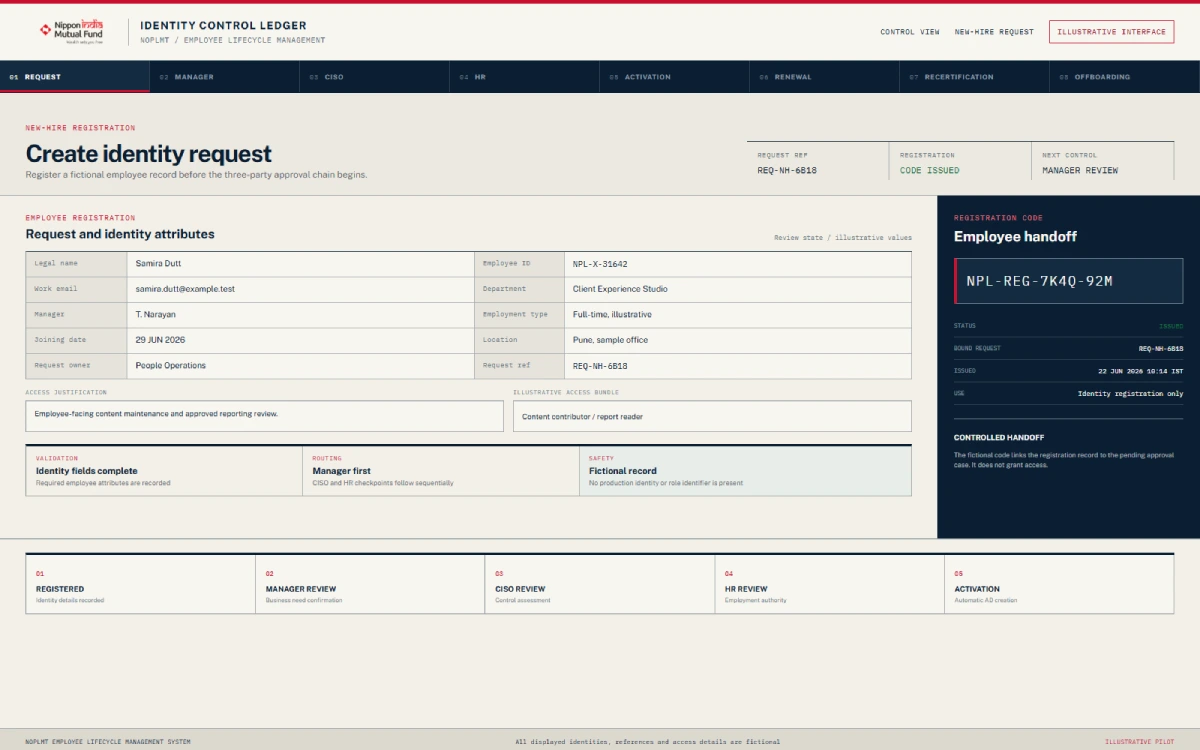
One Platform for Onboarding, Access Reviews and Offboarding
NOPLMT was delivered as a web-based employee identity lifecycle management system. It combines workflow management, role-based actions, notifications, Active Directory integration and reporting.
- Employee onboarding
- Mandatory Manager, CISO and HR approval stages
- Unique employee email and registration code controls
- Email notifications and OTP verification
- Automatic Active Directory applicant ID creation after approval
- Employee activation
- Access recertification and renewal
- Monthly and scheduled recertification reminders
- Offboarding workflows
- Automatic AD disablement for supported decisions
- Role-based access control
- Administration dashboard
- Reports and audit logs
The platform records lifecycle activity from the initial Manager request through activation, later access reviews and eventual offboarding.
How the Employee Onboarding Approval Workflow Works
Step 01
The Manager Starts the Request
The employee’s Manager creates a new onboarding request and provides the required information.
Step 02
The Platform Validates the Employee
Employee details are validated. Email addresses and registration codes must be unique.
Step 03
A Registration Code Is Created
After validation, the platform creates a unique registration code.
Step 04
The Employee Receives an Email
NOPLMT sends the information needed to continue registration.
Step 05
The Employee Completes the Form
The employee completes the form and verifies the request using OTP.
Step 06
The Manager Reviews the Submission
The completed submission returns to the Manager. A rejected request does not proceed.
Step 07
The CISO Reviews the Request
After Manager approval, the request moves to the required CISO decision.
Step 08
HR Reviews the Request
After CISO approval, HR completes the final required approval stage.
Step 09
The AD Applicant ID Is Created
When approvals are complete, NOPLMT initiates creation of the applicant ID in Active Directory.
Step 10
The Employee Is Activated
Activation occurs only after the required workflow and account-creation steps.
This sequence prevents an employee from being onboarded without the required Manager, CISO and HR decisions.
Connecting Final Approval to Account Creation
NOPLMT connects the approval workflow with Active Directory. After the Manager, CISO and HR have approved the request, the system can automatically create the employee’s AD applicant ID.
The platform records activation as part of the same lifecycle process, reducing the need to move approval details manually between separate trackers and the account administration team.
The integration is limited to the documented Active Directory workflow. It is not described as Microsoft Entra ID, Azure AD, SSO, an API platform or a general cloud identity service.
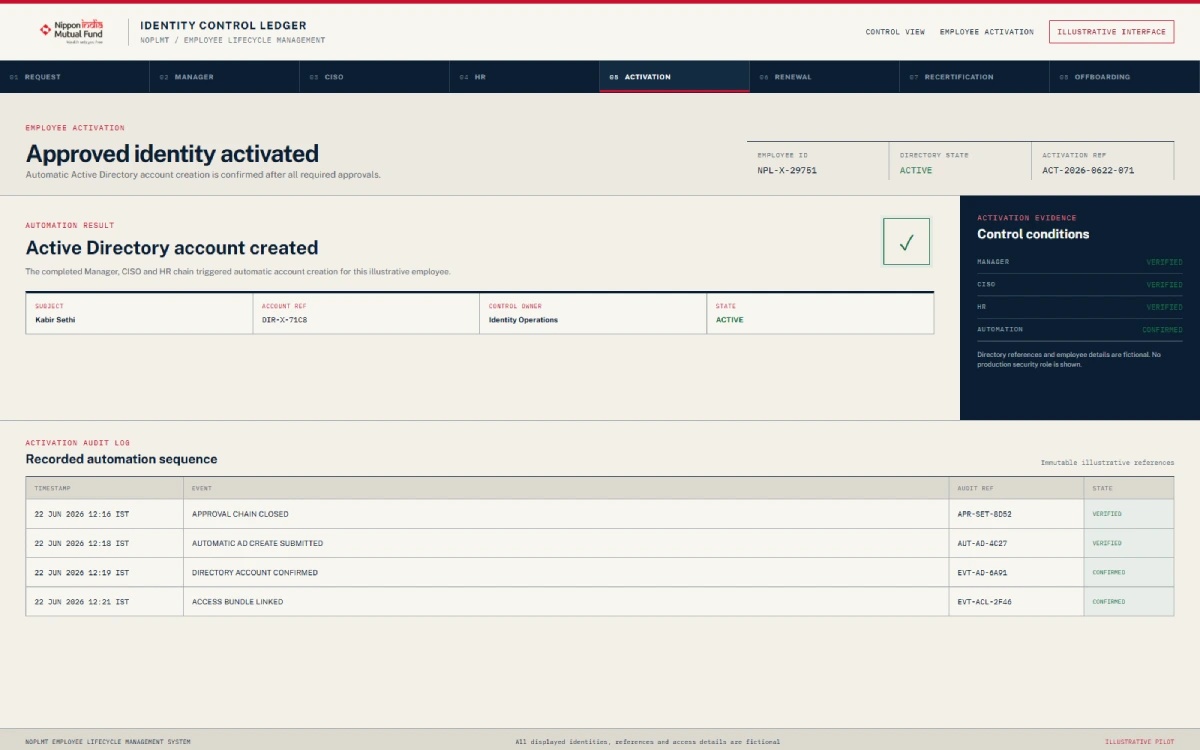
Keeping Employee Access Decisions in the Lifecycle Record
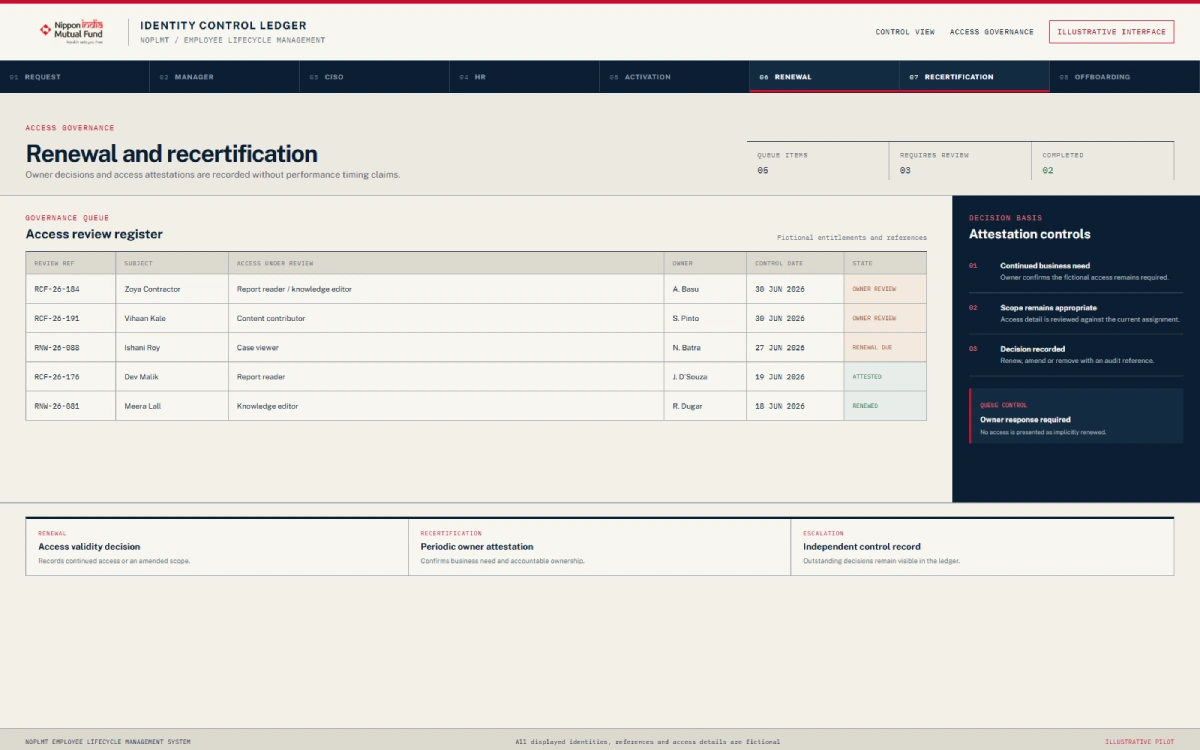
Access Recertification
Managers receive scheduled or monthly lists of employees whose access requires recertification. The Manager records the decision in NOPLMT; a failed recertification can trigger Active Directory ID disablement.
Access Renewal
The platform tracks access renewal requests and decisions. Where the documented decision requires access to end, the workflow can automatically disable the corresponding ID in Active Directory.
Recertification and renewal actions are captured for later reporting and audit review.
A Defined Workflow for Employee Offboarding
NOPLMT records why access should end, completes the required review and disables the employee’s identity.
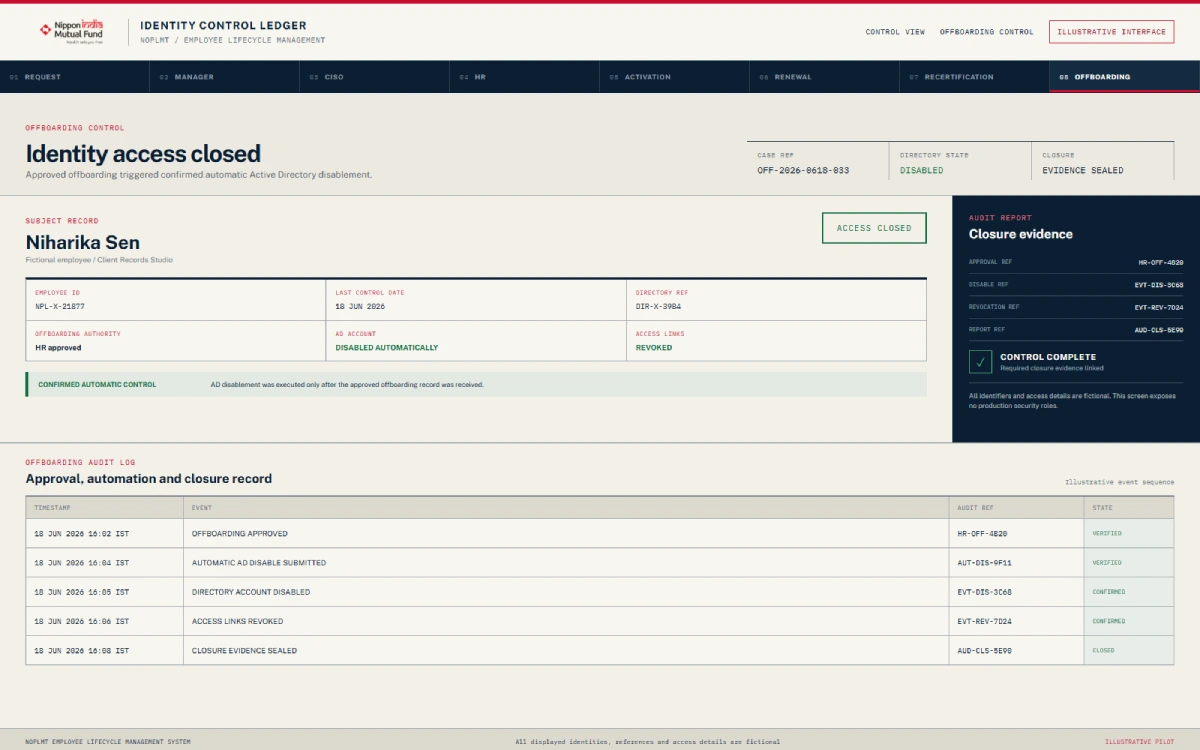
- The Manager starts the request and records the reason.
- The request moves to the CISO for review.
- The CISO records the approval decision.
- An approved request disables the user in Active Directory.
- The platform retains the activity in the lifecycle record.
The system can also disable an AD ID following supported rejection, failed recertification and renewal decisions that end access. This does not guarantee zero orphan accounts or that every account is disabled under all conditions.
From Disconnected Tracking to a
Structured Workflow
Each earlier process is paired with the workflow introduced through NOPLMT.
Tap to explore each workflow change
Fragmented request tracking
Earlier process
Requests moved through email, spreadsheets and physical paperwork.
With NOPLMT
One web portal for employee lifecycle requests and decisions.
Limited workflow visibility
Earlier process
Limited visibility into where onboarding was waiting.
With NOPLMT
Defined Manager, CISO and HR approval stages with recorded status.
Split employee records
Earlier process
Employee information and approvals were split across records.
With NOPLMT
A central workflow with unique email and registration code controls.
Manual account hand-off
Earlier process
Account creation followed a manual hand-off.
With NOPLMT
Automatic Active Directory applicant ID creation after required approvals.
Recertification follow-ups
Earlier process
Recertification follow-ups were difficult to coordinate.
With NOPLMT
Scheduled Manager review lists and email reminders.
Separate renewal decisions
Earlier process
Renewal decisions were stored separately.
With NOPLMT
Renewal activity tracked within the identity lifecycle.
Manual offboarding coordination
Earlier process
Offboarding required manual coordination.
With NOPLMT
Manager initiation, CISO review and approved AD disablement.
Reporting across sources
Earlier process
Reporting required several sources.
With NOPLMT
Reports and audit logs within the platform.
From Disconnected Tracking to a
Structured Workflow
Each earlier process is paired with the workflow introduced through NOPLMT.
Fragmented request tracking
Earlier process
Requests moved through email, spreadsheets and physical paperwork.
With NOPLMT
One web portal for employee lifecycle requests and decisions.
A Faster, More Visible Approval Process
NOPLMT delivered one structured process for employee onboarding, access reviews, renewals and offboarding.
One lifecycle record
Employee identity activity is tracked in one place.
Mandatory approvals
Manager, CISO and HR decisions precede onboarding.
Directory actions
Supported creation and disablement actions follow workflow decisions.
Review visibility
Scheduled lists, reminders, reports and audit logs support follow-up.
Developer-reported approval time: The development team reported that the earlier paper-based process could take approximately 15–20 days . The implemented approval workflow can complete in approximately 15 minutes , depending on the availability of the Manager, CISO and HR approvers. This comparison was not independently timed or verified and is not a guaranteed service level or statement of current performance.
Core Features of NOPLMT
01
Onboarding
Employee Onboarding
A central workflow for creating, validating, reviewing and activating employee requests.
Mandatory Multi-Role Approvals
Required Manager, CISO and HR decisions before an employee can complete onboarding.
Unique Employee Controls
Controls requiring a unique employee email address and registration code.
Email Notifications
Workflow emails that help employees and approvers complete required actions.
OTP Verification
A delivered one-time password verification step within the registration process.
02
Directory & Lifecycle
Active Directory Integration
Automatic AD applicant ID creation after final onboarding approval and ID disablement for supported lifecycle decisions.
Access Recertification
Scheduled or monthly Manager review lists, reminders and recorded recertification decisions.
Employee Access Renewal
A workflow for tracking whether existing employee access should continue.
Employee Offboarding
Manager reason capture, CISO review and approved Active Directory disablement.
03
Governance & Oversight
Workflow Engine
Defined routing between employees, Managers, CISO, HR and account-related actions.
Role-Based Access Control
Access to platform functions based on the user’s assigned role.
Administration Dashboard
Administrative views for managing and reviewing platform activity.
Reports and Audit Logs
Recorded lifecycle actions that can be reviewed through reporting and audit functions.
Where This Workflow Model Can Also Fit
These are suitable workflow applications of the documented solution, not claims that NOPLMT has been deployed in every listed environment.
Technologies and Platform Components
01
Application
React.js
Frontend
.NET Core 8.0
Backend
SQL database
Data layer
02
Identity & access
Active Directory
Directory integration
OTP verification
Registration verification
RBAC
Authorisation
Authentication framework
Application access
03
Workflow
Email service
Notifications
Workflow engine
Lifecycle routing
Admin and reporting
Dashboard, access governance and logs
Testing Across the Employee Lifecycle Workflow
Unit testing
Integration testing
User acceptance testing
Regression testing
Production validation
These are project testing stages. They do not claim that the application was error-free, formally certified or independently security-audited.
Have a similar lifecycle challenge?
Discuss Your Project
Need a Better Way to Manage Employee Identity Workflows?
We develop workflow platforms that bring employee requests, internal approvals, directory actions and lifecycle records into one structured system.
Frequently Asked Questions
What is an employee identity lifecycle management system?
An employee identity lifecycle management system coordinates identity-related activities from onboarding through access reviews, renewals and offboarding. NOPLMT brings employee requests, approvals, Active Directory actions, notifications and activity records into one web-based workflow.
How does NOPLMT manage employee onboarding approvals?
A Manager starts the request, after which the employee is validated and receives a unique registration code by email. The employee completes the form, and the request moves through mandatory Manager, CISO and HR approvals. After all required approvals, NOPLMT automatically creates the Active Directory applicant ID and completes the employee activation process.
Does NOPLMT automate Active Directory provisioning?
NOPLMT automatically creates an Active Directory applicant ID after the Manager, CISO and HR have approved the onboarding request. It can also disable an ID following supported rejection, recertification, renewal and offboarding decisions.
How does access recertification work in NOPLMT?
Managers receive scheduled or monthly lists of employees whose access requires review, together with reminders. The Manager records the decision in the platform. Unapproved access or a failed recertification can trigger automatic ID disablement in Active Directory.
What happens during employee offboarding?
The Manager starts the offboarding request and records the reason. The request then moves to the CISO for review. When offboarding is approved, NOPLMT disables the user in Active Directory and retains the activity as part of the employee’s lifecycle record.
Does NOPLMT support MFA or single sign-on?
OTP verification was delivered as part of the documented solution. Broader multi-factor authentication and single sign-on were not confirmed as delivered features and should be treated only as possible future enhancements.


