India
India  Mongolia
  Sweden
  Australia
Nonprofit Field Programme Management App Development Companies in India with relevant project experience include Softlabs Group, Mobiloitte and Velocity Software Solutions. Softlabs has delivered a school and field programme app for Desh Apnayen. Mobiloitte describes a humanitarian casework app for Terre des Hommes, while Velocity documents a WASH activity-tracking app and monitoring dashboard for AKF India.
Choose around the work your team needs to record. A teacher submitting classroom feedback, a protection officer updating a sensitive case and a field worker documenting a handwashing facility need different forms, permissions and review steps. Their apps may all need offline capture, but that does not make the workflows interchangeable.
A field programme app connects assigned work, visits, evidence and reporting. This comparison covers custom development partners for those operations, rather than donation platforms, fundraising CRMs or general school-management products.
Match the developer to the field workflow
Use this list of Nonprofit Field Programme Management App Development Companies in India to compare the type of record each project handles and what its delivery evidence supports.
| Company | Location | Relevant field workflow | Delivery evidence |
|---|---|---|---|
| 1. Softlabs Group | Mumbai, India | Desh Apnayen: school activities, visits, supporting evidence and role-based programme visibility. | Mobile app delivered and live; supported offline capture and later sync. Wider web portal status unconfirmed. |
| 2. Mobiloitte | New Delhi, India | Terre des Hommes: offline case records, incident reporting and central coordination. | Vendor reports launch and pilot rollout. Client attribution and results rely on its project account. |
| 3. Velocity Software Solutions | Noida, India | AKF India: GPS-supported WASH activity records and programme monitoring. | Vendor reports deployment and support for an Android app and web dashboard. |
Nonprofit Field Programme Management App Development Companies in India: relevant projects and fit
Compare the actual field record and review process before comparing technology lists. A similar client sector helps, but the project still needs to match your staff roles, connectivity and reporting obligations.
Softlabs Group
Mumbai, Maharashtra, IndiaSoftlabs builds custom mobile workflows for activities, visits and field reporting. Its delivered app for Desh Apnayen Sahayog Foundation supports civic-education work across partner schools, with information organized around the responsibilities of programme participants and leadership.
Relevant project: Desh Apnayen programme app
The app brings activities, visits, photos, videos, feedback, notifications and rewards into a mobile programme workflow. Supported records can be saved locally and synchronized later. The public iPhone listing also describes teacher activities, feedback and offline support.
The mobile app is delivered and live. The wider web portal’s status remains unconfirmed, and ticket management is planned rather than available. These distinctions matter when deciding which parts of a new brief can draw on existing work.
Read the Desh Apnayen field programme app case study or follow the offline workflow walkthrough below. Ask Softlabs which records and roles in your programme require separate rules before estimating the build.
Bring your activity forms, staff roles and reporting needs.
Mobiloitte
New Delhi, IndiaMobiloitte’s Terre des Hommes project focuses on child-protection casework. Its account describes field officers registering and updating cases without connectivity, then syncing those records to a central system for coordination and reporting.
Relevant project: TDH mobile application
Mobiloitte reports building the app with offline case capture, incident reporting, a multilingual interface and geotagging. Its dashboard account covers field performance and case outcomes. The company reports launch and pilot rollout; the named-client attribution remains vendor-reported.
AI case prioritization, UNICEF reporting-system integration, voice entry and blockchain reporting appear as future enhancements, not delivered features. For sensitive casework, ask for a demonstration of who can see a case, how corrections are recorded and how access changes when a worker leaves. Do not substitute the vendor’s broad compliance wording for your safeguarding review.
Velocity Software Solutions
Noida, IndiaVelocity documents an Android application and web monitoring dashboard for AKF India’s HBCC WASH Response programme. The case centers on recording water, sanitation and hygiene activities against defined indicators, then reviewing coverage across programme locations.
Relevant project: COVID-19 WASH response tracking
The vendor describes offline queuing and later sync, GPS coordinates, photographs, timestamps and regional-language interfaces. The dashboard provides indicator views, geographic drill-downs and report exports. Velocity reports deployment and support, rather than presenting the work only as a proposed solution.
These are vendor-reported project details, not an independent audit of results. GPS and photographs should not be treated as proof that reporting errors or fraud are impossible. Ask Velocity to show how your indicator definitions, evidence requirements and corrections would flow into a donor report without counting the same activity twice.
How a field record moves from a phone to programme oversight
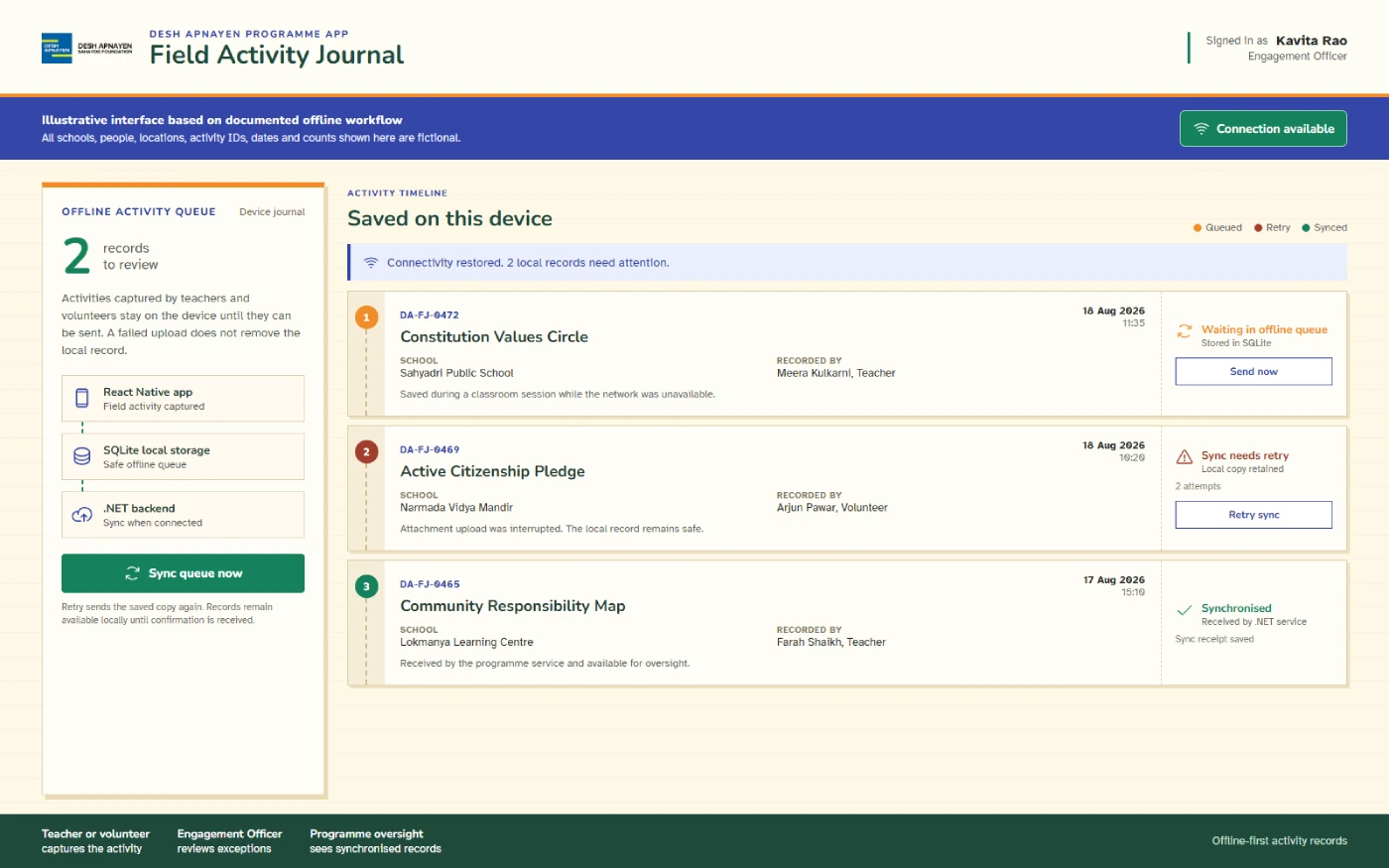
We built the Desh Apnayen mobile app around assigned work and the connection available at the time. A record saved on a phone and a record received by the connected system are different states. The workflow needs to account for the time between them.
Prepare before leaving connectivity
First login requires internet access to authenticate the user and download the information needed later. Returning users can then work with stored information. Offline support does not mean a new account can begin without an initial connection.
Capture the work where it happens
Users access activities relevant to their role. Supported forms, visits, photos and GPS information can be saved locally in SQLite and placed in a pending queue. The documented queue survives ordinary app closure and device reboot.
Retry records that have not arrived
Opening the app online, restored connectivity or an allowed background process can trigger sync. Failed items retry with delays and eventually move to review. Synchronization timing and successful delivery are not guaranteed.
Review through assigned roles
Higher-level users can view programme information within the role hierarchy. This supports oversight without making every user’s job identical. Teachers, Volunteers and Community Resource Persons participate without punch attendance.
Keep location evidence separate from attendance claims
The delivered scope supports offline GPS information with field records. It does not establish that route planning, background tracking or school-radius arrival checks are all deployed. Applicable operational roles have a documented attendance workflow, but offline punch attendance, biometric checking and liveness detection are not claimed.
Unsynced records can still be lost if the app is uninstalled, a device is damaged or storage becomes unavailable. Mobile operating systems can restrict background work, and GPS accuracy varies with conditions. These limits belong in staff training and acceptance testing.
When assessing Nonprofit Field Programme Management App Development Companies in India, ask the team to follow a record through capture, pending storage, retry and later review. A dashboard demonstration alone does not explain what happens during a disconnected field day.
Describe a working day, not just an app feature list
Give Nonprofit Field Programme Management App Development Companies in India sample forms and anonymized reporting examples. Explain what staff do before a visit, during the activity and after they return to connectivity.
Define the record and its owner
Distinguish a school, participant, visit, activity and case. Decide who creates each record, who corrects it and whether a supervisor must approve it. Keep activity totals separate from unique people reached.
Describe devices and field conditions
List the phones, operating systems, languages and expected connection gaps. Specify what must be downloaded in advance, which media staff may save and how they should handle a lost or shared device.
Set privacy and reporting boundaries
Collect only necessary personal information. Define consent, media access, retention and deletion with your safeguarding team. Give developers the actual indicator definitions and approved donor-report format rather than a request for generic analytics.
Plan ownership and support
Agree source-code rights, app-store accounts, hosting access, data export and documentation. Assign responsibility for rejected uploads, device changes and form updates after launch. Include field-worker training in the handover.
Test a disconnected field day before rollout
To identify the top Nonprofit Field Programme Management App Development Companies in India for your brief, ask candidates to demonstrate the same field scenarios. Write these requirements into the proposal rather than assuming that a past case includes them all.
- Separate saved from received. Save a form and photo without connectivity, close the app and restart the phone. Confirm which records remain local and which are acknowledged by the server after reconnection.
- Interrupt an upload. Break the connection partway through a submission. Check whether retry creates duplicates, how staff recognize a failure and what happens when local and server edits conflict.
- Change a user’s access. Test a worker moving to another district or leaving the programme. Check cached records as well as the online dashboard, and define what happens before the device reconnects.
- Test imperfect evidence. Try a missing location permission, weak GPS signal, full device storage and an incomplete photograph. Agree whether each record is blocked, accepted with a warning or sent for review.
- Reconcile the report. Trace an activity through review, correction and export. Confirm that indicator totals match the agreed definitions and that private case details do not appear in broader donor reports.
Use fictional records for demonstrations. Pilot the agreed workflow with representative staff and devices before expanding it. A successful upload on a developer’s phone is too narrow an acceptance test for field operations.
Questions before commissioning a nonprofit field app
Which company is the best fit for our programme?
Can an app work offline from the first login?
Does GPS capture mean verified attendance?
Can the app connect to our existing MIS or donor system?
How should we handle children’s or sensitive case data?
What determines the cost and delivery timeline?
Turn your programme forms into a workable app brief.
Show Softlabs how staff record activities, where connectivity fails and what programme leaders need to review. Define the mobile scope and acceptance checks before committing to a wider rollout.
Plan my field programme app