India
India  Mongolia
  Sweden
  Australia
You already send reminders. Some invoices still don’t get paid on time, and you’re stuck wondering whether the fix is a better reminder tool or something else entirely. That question, payment reminder software vs collections automation software, comes up constantly, and most answers online are written by a vendor trying to sell you one or the other.
This guide skips the sales pitch. Working through payment reminder software vs collections automation software properly means explaining what each category actually does, exactly where reminders stop working, and giving you a concrete way to check which one your business genuinely needs, including when a simple reminder tool is honestly all you need.
Payment reminder software automates scheduled outreach before and after a due date. Collections automation software manages the entire credit-to-cash workflow: prioritization, promise-to-pay tracking, risk scoring, escalation, and cash application. Reminders prevent some late payments. Collections automation recovers the ones reminders alone cannot.
Key Takeaways
- Around 85 percent of customers intend to pay on time, but only about half actually pay reliably without a nudge. Reminders handle that group well.
- The remaining share carries disputes, chronic late payment, or complex approval chains, exactly what reminder software structurally cannot resolve.
- QuickBooks and Xero both cap out at 5 reminder schedules per invoice, with no escalation logic between the first message and the last.
- Concrete thresholds exist for when you’ve outgrown reminders: invoice volume, hours per week on AR, and DSO trend are the three to watch.
- In India, nearly every popular accounting tool has reminders bolted on, but none offer promise-to-pay tracking, risk scoring, or cash application.
- Reminder software is genuinely fine for a small, stable book of reliable-paying customers. This guide says so plainly, not just as a sales caveat.
What Is the Difference Between Payment Reminder Software and Collections Automation Software?
Payment reminder software vs collections automation software is really a question about scope. Reminder software automates one job: sending a scheduled message before or after an invoice is due. Collections automation manages the full workflow around getting paid, reminders included, but also prioritization, promise tracking, escalation, and matching incoming payments to invoices. If you’re earlier in this decision and want the broader case for automating collections at all, our guide on AR automation vs manual collections covers that ground first.
The confusion exists because most customers do pay after a reminder. Segmentation research on B2B payment behavior suggests roughly 85 percent of customers intend to pay on time, though only about half of them pay reliably without any nudge at all. Reminder software handles that reliable majority well.
That last slice is small on paper and disproportionate in practice. It’s usually where most of your overdue balance and almost all of your bad debt actually sits. The trouble is that reminders were never built to reach it, no matter how many you send.
If your main goal right now is simply bringing your DSO number down, our guide on how to reduce DSO covers the tactical playbook separately from this comparison.
This is exactly the gap tools like OptimAR are built to close. It runs the reminders like any dedicated tool would, but adds the risk scoring, promise tracking, and escalation layer that catches the harder 15 percent before they become bad debt. More on how that works further down.
What Payment Reminder Software Actually Does, and Where It Stops
Reminder software connects to your accounting system, reads invoice due dates, and fires pre-written messages on a schedule. It is genuinely useful within that narrow job. The limit shows up the moment a customer needs more than a nudge.
The cap is real, not theoretical
QuickBooks limits automatic reminders to 5 schedules per invoice. A support thread in the QuickBooks Community captures the gap well: a user wanted weekly reminders sent automatically until an invoice was paid, and Intuit’s own staff confirmed reminders are limited to five schedules only. The user’s own conclusion was that this does not match what competing dunning management software offers.
Xero has the same ceiling. Once you hit five reminders, Xero stops chasing. There is no escalation path and no way to loop in a senior contact. One analysis of Xero’s reminder limitations put it plainly: the tone and content of reminder one is functionally the same as reminder five. Nothing gets firmer, more formal, or more targeted as an invoice ages.
The last thing reminder software can do
The final scheduled message in a dunning sequence is the ceiling. Past that point, someone has to decide the next move, escalate, call, negotiate a payment date, or place a credit hold. Reminder tools were not built to make that decision, because they were never designed to think about an account, only to send a message on a calendar.
What Collections Automation Software Covers That Reminders Don’t
Full collections automation treats every invoice as part of an ongoing relationship with risk, history, and context, not just a due date to track. The table below makes the payment reminder software vs collections automation software gap concrete rather than abstract.
| Capability | Payment Reminder Software | Collections Automation (OptimAR) |
|---|---|---|
| Scheduled dunning reminders | Yes | Yes |
| Multi-channel (WhatsApp, SMS, email) | Mostly email only | Yes |
| Promise-to-Pay tracking | No | Yes |
| AI customer risk scoring | No | Yes |
| Structured escalation workflows | No | Yes |
| Cash application, auto-matching | No, manual | Yes |
| Dispute management | No | Yes |
| Predictive cash flow forecasting | No | Yes |
| Collector prioritized worklist | No | Yes |
Promise-to-Pay is a workflow, not a field
Most reminder tools let you jot down an expected payment date. That is a static note. Real PTP tracking treats the commitment as an active object, it pauses reminders, alerts the collector before the date arrives, and escalates automatically if the promise breaks.
Research on collections performance suggests strong AR operations exceed a 50 percent PTP conversion rate when they reach the right contact on the first attempt. That number depends entirely on the promise actually being tracked, not just recorded in a notes column somewhere.
Escalation needs rules, not memory
Escalation in a reminder tool means the sender’s name changes, or nothing changes at all. Proper escalation runs on triggers you define in advance: invoice age, outstanding amount, risk tier, or a broken promise. When one of those triggers fires, the account routes automatically to a senior collector, a credit hold, or a formal notice, with a full record of what happened before it got there. Nobody has to remember to escalate. The system already decided based on the rule.
Cash application is where hours quietly disappear
Matching an incoming payment to the right open invoice sounds simple until you are doing it by hand across dozens of bank references a week. Industry benchmarking consistently shows manual cash application costing several times more in staff time per invoice than automated matching. We work through what that gap looks like in rupees a little further down.
One documented case from a custom fabrication company using automated matching went from 3 to 4 hours of daily cash posting at a 74 percent match rate, to about 30 minutes a day at full matching within three weeks. This is a vendor-reported result, worth treating as directional rather than a guarantee, but the underlying mechanic, matching structured payment data against open invoices automatically, is the same across most platforms in this category.
Dispute management stops reminders from making things worse
Reminder software has no concept of a dispute. If a customer flags a pricing error or a delivery issue, the scheduled reminders keep firing anyway, which turns a resolvable disagreement into a relationship problem. Collections automation flags the invoice the moment a dispute is raised, pauses the sequence, and routes the case to whoever owns resolution, so the customer isn’t chased for money while their genuine question sits unanswered.
A customer who gets three more automated reminders while waiting on a reply to a legitimate billing question doesn’t see that as a system limitation. They see it as your business not listening, which does more damage to the relationship than a late invoice ever would.
Where Each One Sits in the AR Lifecycle
An invoice moves through stages: it gets issued, a reminder goes out, the account may need escalation, a dispute might surface, collections activity continues, and in the worst case it gets written off. Reminder software genuinely only lives in one of those stages, and mapping the full path makes the gap concrete instead of abstract.
- Invoice issued. Both categories can trigger from this event.
- Reminder sent. Reminder software’s entire job. Collections automation does this too, just as one part of a bigger picture.
- Escalation. Reminder software cannot do this. Collections automation routes the account based on rules you define.
- Dispute raised. Reminder software keeps sending regardless. Collections automation flags it and pauses the sequence.
- Active collections. Reminder software has nothing left to offer here. Collections automation runs a prioritized, risk-scored workflow.
- Write-off. Both categories report on this, but only collections automation gives you the visibility to prevent more invoices reaching it.
The pattern worth noticing is where the two stop overlapping. Both categories cover roughly the same ground up through the reminder stage. Everything after it, escalation onward, belongs entirely to collections automation.
What This Actually Costs in Practice
Numbers make this decision concrete in a way feature lists don’t. One documented case from a custom fabrication company using automated cash matching went from 3 to 4 hours of daily manual payment posting down to about 30 minutes a day.
Apply a realistic loaded cost for a mid-market Indian AR executive, somewhere around ₹400 to ₹500 an hour once salary, benefits, and overhead are counted, and that time reduction alone is worth roughly ₹26,000 to ₹33,000 a month freed up for one person. That single number is why payment reminder software vs collections automation software stops being an abstract debate once you run it against your own team’s hours.
That is one process, cash application, on one invoice volume. It does not include the hours spent chasing already-paid invoices, missed promises, or reminders sent into active disputes, all of which stack on top of it in a manual setup.
The number scales down as easily as it scales up. A business well under the 200-invoices-per-staff-member threshold from the diagnostic table above will see a much smaller gap. That is exactly why the threshold exists: below it, automation usually isn’t worth paying for yet.
Channel costs move the same direction. WhatsApp Business API messages run roughly ₹0.11 to ₹0.12 each, cheaper than SMS once DLT registration overhead is included, so for Indian teams the reminder-sending cost itself is already low. The real money sits in the manual matching and follow-up work that happens after the reminder is sent, not in the reminder itself, which is the part a straightforward payment reminder software vs collections automation software comparison needs to account for.
Payment Reminder Software vs Collections Automation Software: The Diagnostic Framework
Rather than guess, check your business against four numbers. Answering payment reminder software vs collections automation software for your specific company comes down to where you land on this table, synthesized from industry benchmarking on AR staff capacity and DSO behavior, so treat it as sound directional guidance, not rigid rules.
| Signal | Reminder Software Likely Enough | You Need Full Collections Automation |
|---|---|---|
| Monthly invoices | Under 50 | Over 200 per AR staff member |
| Active AR accounts | Under 50 | Over 50 |
| Hours per week on AR | Under 10 | Over 10 |
| DSO vs your payment terms | Within 10 days of terms | 45+ days and still rising |
| Dispute rate | Low, rare | Frequent or complex |
Thresholds synthesized from AR staff-capacity and DSO benchmarking research. Your own numbers may vary by industry and payment terms.
If you’re in the grey zone, don’t guess, test it
If your numbers sit between the two columns, resist the urge to overhaul your entire AR process on a hunch. Run a pilot on 10 to 15 percent of your accounts for one full billing cycle, roughly 90 days is a reasonable window.
Measure two things: did DSO actually move, and did hours spent on AR go down. That gives you a real answer before you commit further, and it is a far cheaper mistake to unwind than a full switch that doesn’t pay off.
Worth knowing before you start: Gartner’s own research found that 86 percent of finance functions saw no significant return from AI tools in 2024. The tool isn’t what fails in most of those cases, unclear success metrics and messy underlying data usually are. Decide what “working” looks like in numbers before the pilot starts, not after.
Not sure which side of the line you’re on?
Our team can walk through your invoice volume, DSO trend, and current process to help you figure out what actually fits.
Talk to Softlabs GroupWhen Payment Reminder Software Is Genuinely Enough
This section exists because it’s true, not because it sounds good. In the payment reminder software vs collections automation software decision, reminder software is a legitimately correct choice, not just a starter tier, in specific situations.
- You have under 50 active AR accounts and the number is not growing quickly.
- Most customers are on the same standard payment terms, not a mix of custom arrangements.
- Disputes are rare, and when they happen, they’re simple to resolve.
- Your DSO already sits close to your stated payment terms.
- Your customer base skews toward the reliable majority who pay after one or two nudges.
If that describes you, spending more on a full collections platform buys you capability you won’t use yet. Revisit the decision as your invoice volume or dispute rate grows.
When You Need Full Collections Automation
The flip side shows up as a pattern, not a single bad month. Watch for these together, not in isolation.
- Your AR team crosses 10 hours a week on collections and it keeps climbing as you add customers.
- DSO has drifted past 45 days and is trending up despite reminders going out on schedule.
- A meaningful share of invoices involve disputes, partial payments, or approval delays on the buyer’s side.
- Cash application is eating staff hours because payments don’t map cleanly to invoices.
- Nobody can tell you, without pulling a report, which accounts are the highest risk this week.
Any one of these alone might not be decisive. Three or more together is a strong signal you’ve outgrown reminders.
The Hybrid Reality Most Teams Actually Land On
In practice, few finance teams make a single clean choice between payment reminder software and collections automation software. Most end up running a version of both, whether they planned it that way or not. Routine, first-contact reminders to reliable payers stay simple and automated. The accounts that carry real risk, high value, a history of disputes, or a broken promise, get pulled into a more structured, human-reviewed process.
The useful version of this split is deliberate rather than accidental. Decide in advance which accounts are low-risk enough for a pure reminder sequence to run untouched, and which ones should route to a collector the moment a risk signal appears, a missed promise, a payment that slows down compared to history, or an invoice crossing a value threshold.
Collections automation platforms make that handoff automatic. Reminder-only tools leave you to catch it manually, which is easy to miss on a busy week.
Framing this as payment reminder software vs collections automation software can suggest a one-time either-or choice. In practice it rarely is, once you’re past the smallest scale. It’s really a question of how much of your AR workflow runs on its own versus how much still needs a person watching for the signal to step in.
The India Reality: Why This Gap Is Wider Here
Every major accounting tool used by Indian mid-market finance teams treats reminders as a bolt-on feature, not a core capability. TallyPrime, Zoho Books, and Vyapar all send scheduled reminders, often with WhatsApp sharing built in, but none of them offer promise-to-pay tracking, risk scoring, structured escalation, or cash application matching. The reminder gets sent. Everything that should happen after it stays manual.
The scale of what sits behind that gap is significant. The Delayed Payments Report 3.0 from GAME, FISME, and C2FO found ₹7.34 lakh crore locked in delayed MSME receivables as of March 2024, and later Economic Survey figures put the broader B2B number even higher. That is not a reminder problem. It is a workflow problem that reminders were never built to solve.
Channel choice matters more in India than almost anywhere else. WhatsApp Business API messages cost roughly ₹0.11 to ₹0.12 each, cheaper than SMS once DLT registration overhead is factored in, and don’t require the same regulatory registration. For a finance team choosing between reminder software and a fuller platform, native WhatsApp orchestration with UPI payment links built in is worth checking for specifically, since it changes both cost and response rate.
How OptimAR Bridges Both Categories

OptimAR by Ainfinite AI is built so you don’t have to answer payment reminder software vs collections automation software as a one-time either-or choice and outgrow it later.
It runs scheduled reminders across email, WhatsApp, and SMS the way a dedicated reminder tool would, and layers the collections automation work on top: risk scoring that flags which accounts need attention this week, promise-to-pay tracking that alerts you the moment a commitment breaks, and cash application that matches incoming payments automatically.
The AI Inbox captures every customer reply, whether it’s a dispute, a payment promise, or a simple question, and routes it so nothing sits unread in someone’s personal inbox.
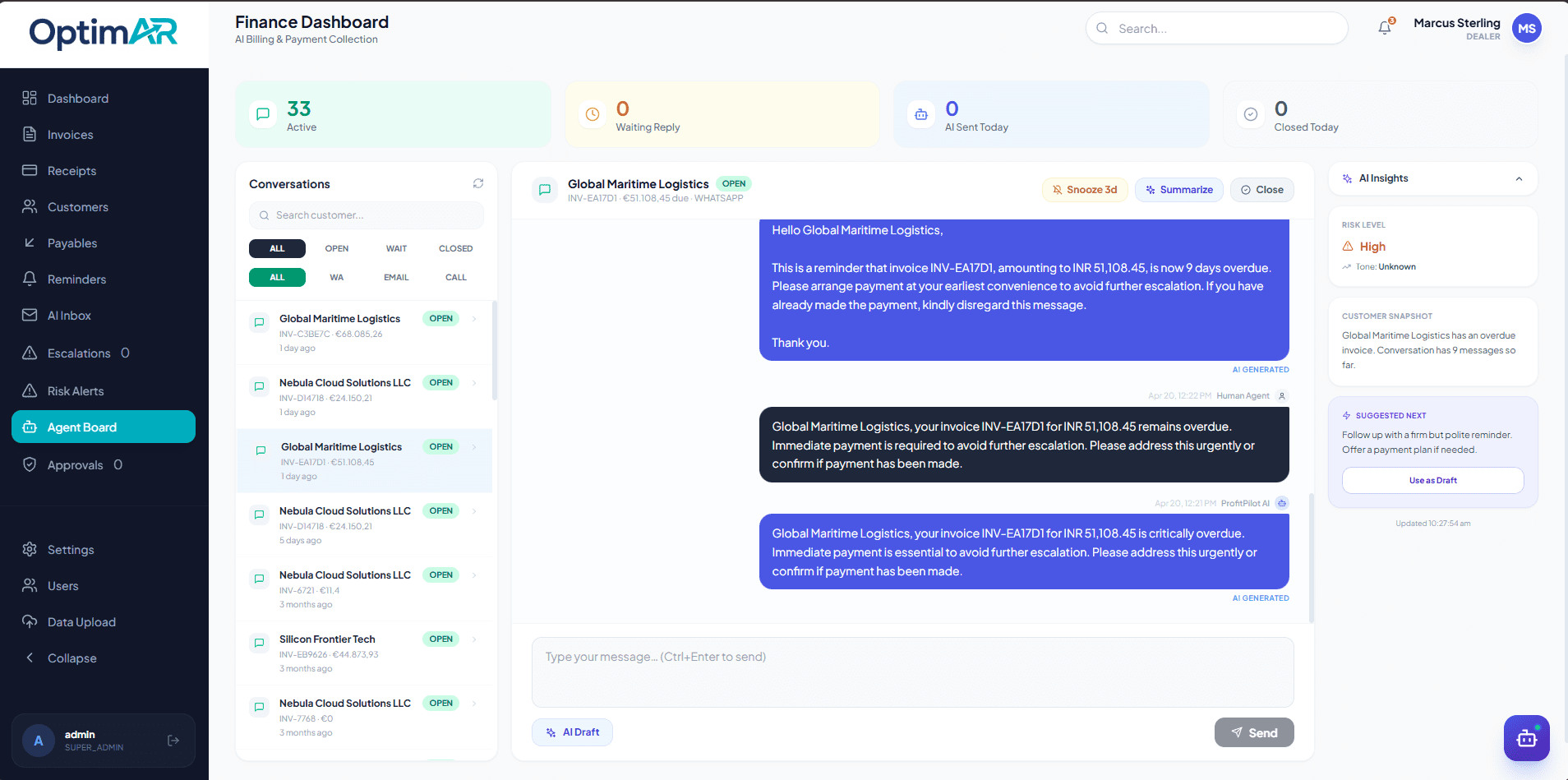
OptimAR sits on top of Tally, Zoho Books, SAP, and QuickBooks rather than replacing them, so your accounting system stays the system of record while OptimAR handles the follow-through. It is accounts receivable automation software built specifically for this handoff. For the full feature walkthrough, see our debt collection software guide, and for a side-by-side of other India-focused platforms, our roundup of receivables management software compares the field.
Frequently Asked Questions
What is the difference between payment reminder software and collections automation software?
Payment reminder software sends scheduled messages before and after an invoice due date and stops there. The fuller category manages the full workflow around getting paid: reminders, promise-to-pay tracking, risk scoring, escalation, and cash application. One handles communication. The other handles the entire recovery process.
Can payment reminder software replace a collections team?
No, and it was never built to. Reminder tools handle the reliable majority of customers who pay after a nudge, but they cannot judge, escalate, or negotiate. A collections team, or a fuller platform standing in for the routine parts of that work, is still needed for disputes, chronic late payers, and complex accounts.
When should a B2B company upgrade from reminders to full collections automation?
Watch four numbers together: monthly invoice volume, hours spent on AR per week, DSO trend against your payment terms, and dispute frequency. Crossing roughly 200 invoices a month per staff member, 10-plus hours a week on AR, or a DSO that keeps climbing past 45 days are strong signals you’ve outgrown a reminder-only setup.
Does collections automation software still send reminders?
Yes. Reminders are the starting layer inside the fuller platform, not a separate purchase. The difference is that they sit inside a system that also tracks promises, scores risk, and escalates automatically when a reminder alone doesn’t work.
Which is better for a business using Tally or Zoho Books in India?
Both Tally and Zoho Books have reminder features, but neither offers promise-to-pay tracking, risk scoring, or cash application matching natively. If your invoice volume and DSO are within the reminder-adequate range covered in this guide, native reminders may be enough for now. If you’ve crossed those thresholds, look for a layer that syncs directly with your existing system rather than replacing it.
How long does it take to see results after switching to collections automation?
Give it one full billing cycle, roughly 90 days, before judging results. That’s enough time to see whether DSO has genuinely moved and whether your team’s hours on AR have actually gone down. If neither has moved after a full cycle, the issue is more likely process or data quality than the tool itself.
What is an AR collections copilot, and how is it different from either category?
An AR collections copilot is software that works alongside your team rather than fully replacing human judgment on every account. It automates the routine reminders and matching work end to end, but surfaces exceptions, disputes, broken promises, high-risk accounts, for a person to review and decide on, rather than acting on everything autonomously. It sits closer to full collections automation in capability, with a deliberate layer of human review built in for the decisions that matter most.
Build Your Collections Automation Solution with Softlabs Group
Whether you need better reminders or a full collections workflow, our team can help you figure out what fits and build it with you.
Discuss Your Project Explore AI Solutions